# Architecture
URL: /core/architecture
***
title: Architecture
description: How Recal is built - edge computing, tech stack, and deployment.
icon: Lightbulb
---------------
## Edge-First Infrastructure
Recal runs on the edge for low-latency global performance.
**API** → [Cloudflare Workers](https://developers.cloudflare.com/workers/) (edge compute)
**Web/Dashboard** → [Vercel](https://vercel.com/) (edge functions)
Requests process close to users—no central bottleneck.
## Tech Stack
### Backend
* **Hono** — TypeScript API framework
### Frontend
* **Next.js 15** — React framework with App Router
* **Fumadocs** — Documentation system (these docs)
* **Tailwind CSS** — Styling
## Resources
* [Turborepo](https://turbo.build/docs)
* [Hono](https://hono.dev/)
* [Next.js](https://nextjs.org/docs)
* [Cloudflare Workers](https://developers.cloudflare.com/workers/)
# Dashboard
URL: /core/dashboard
***
title: Dashboard
description: Manage API keys, OAuth credentials, organizations, and users through the web interface.
icon: LayoutDashboard
---------------------
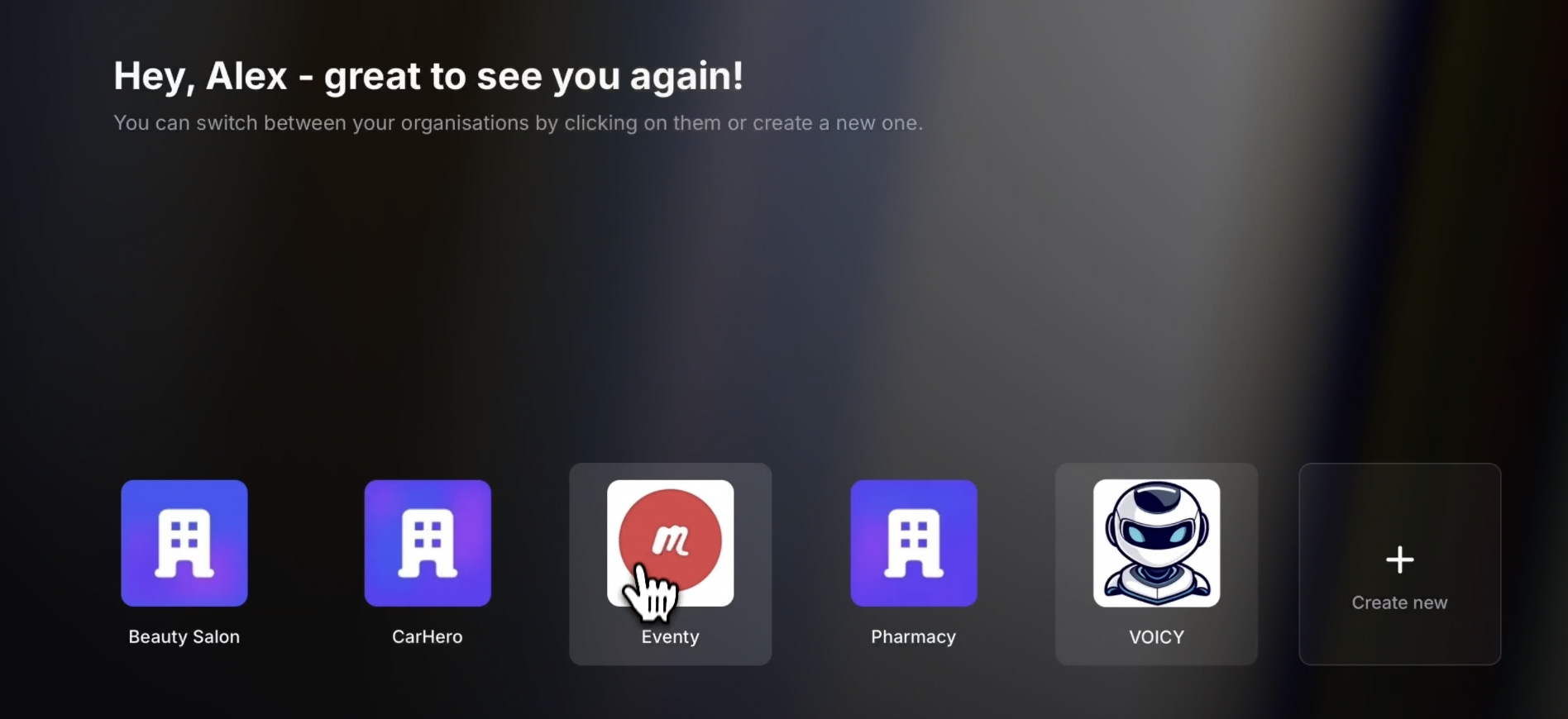
The Dashboard at [dash.recal.dev](https://dash.recal.dev) is your control panel for managing integrations and users.
## Sections
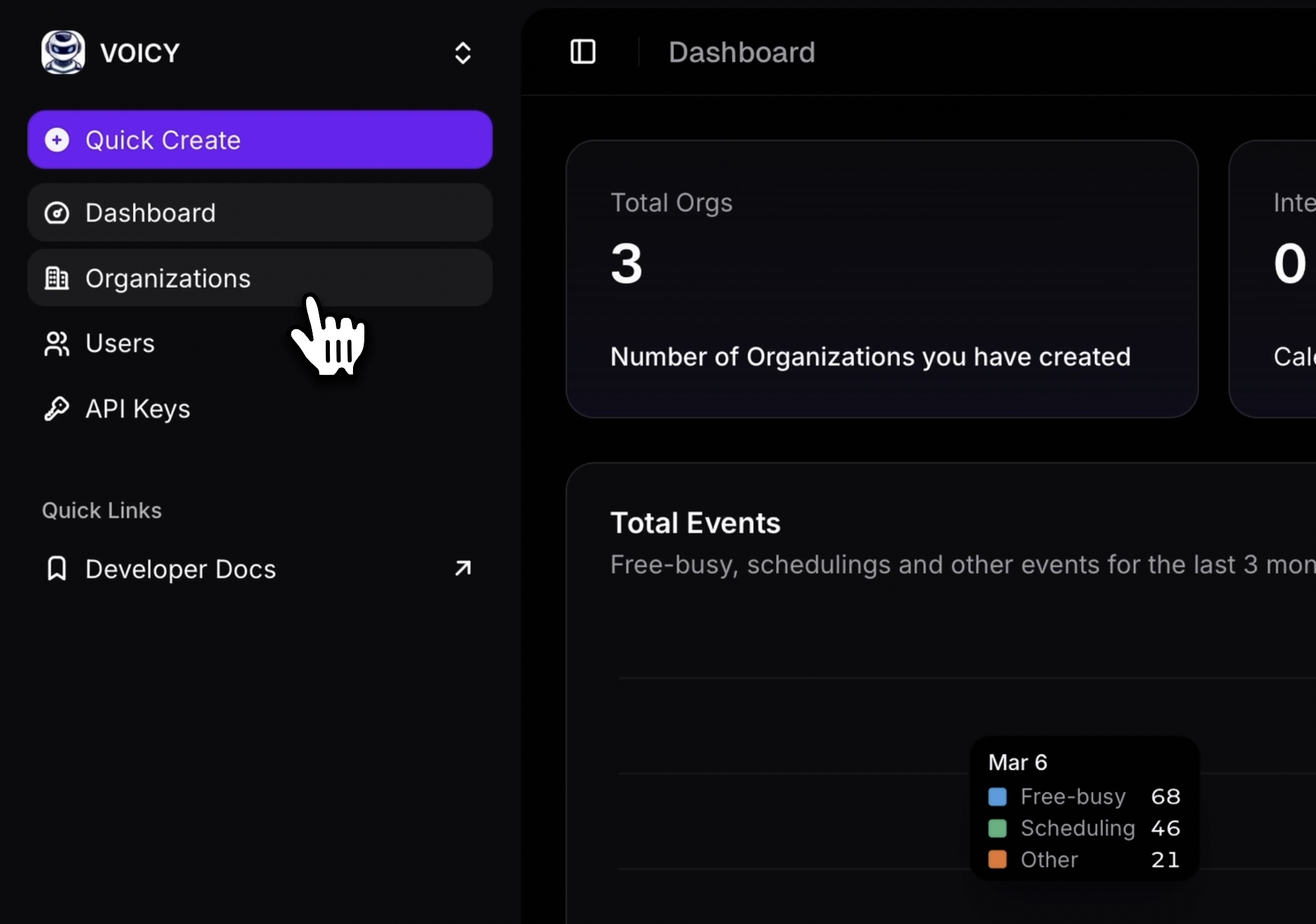
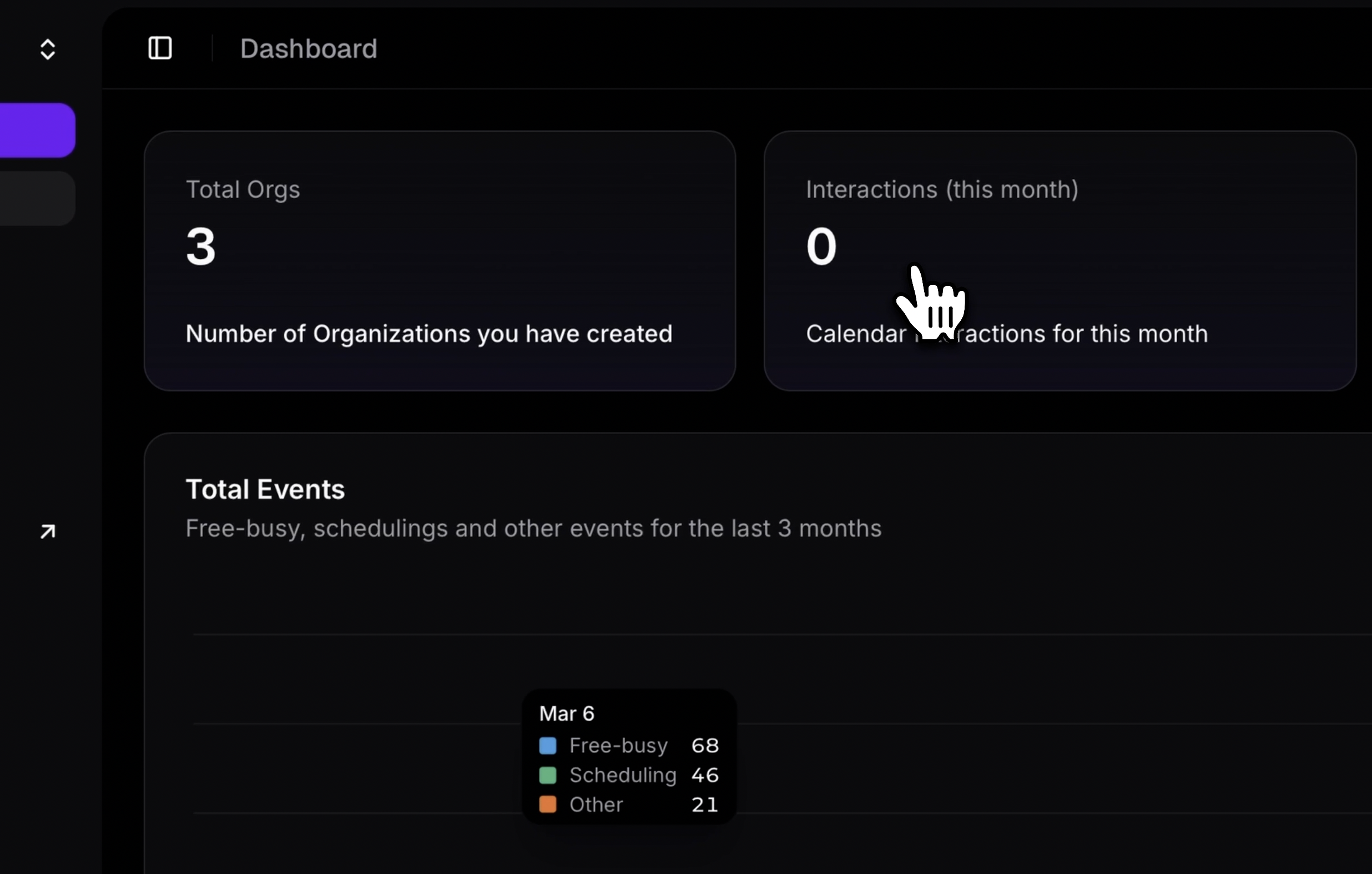
**Usage Dashboard** — Metrics, activity, API request volumes
**API Keys** — Create tokens for authentication (copy immediately—shown once)
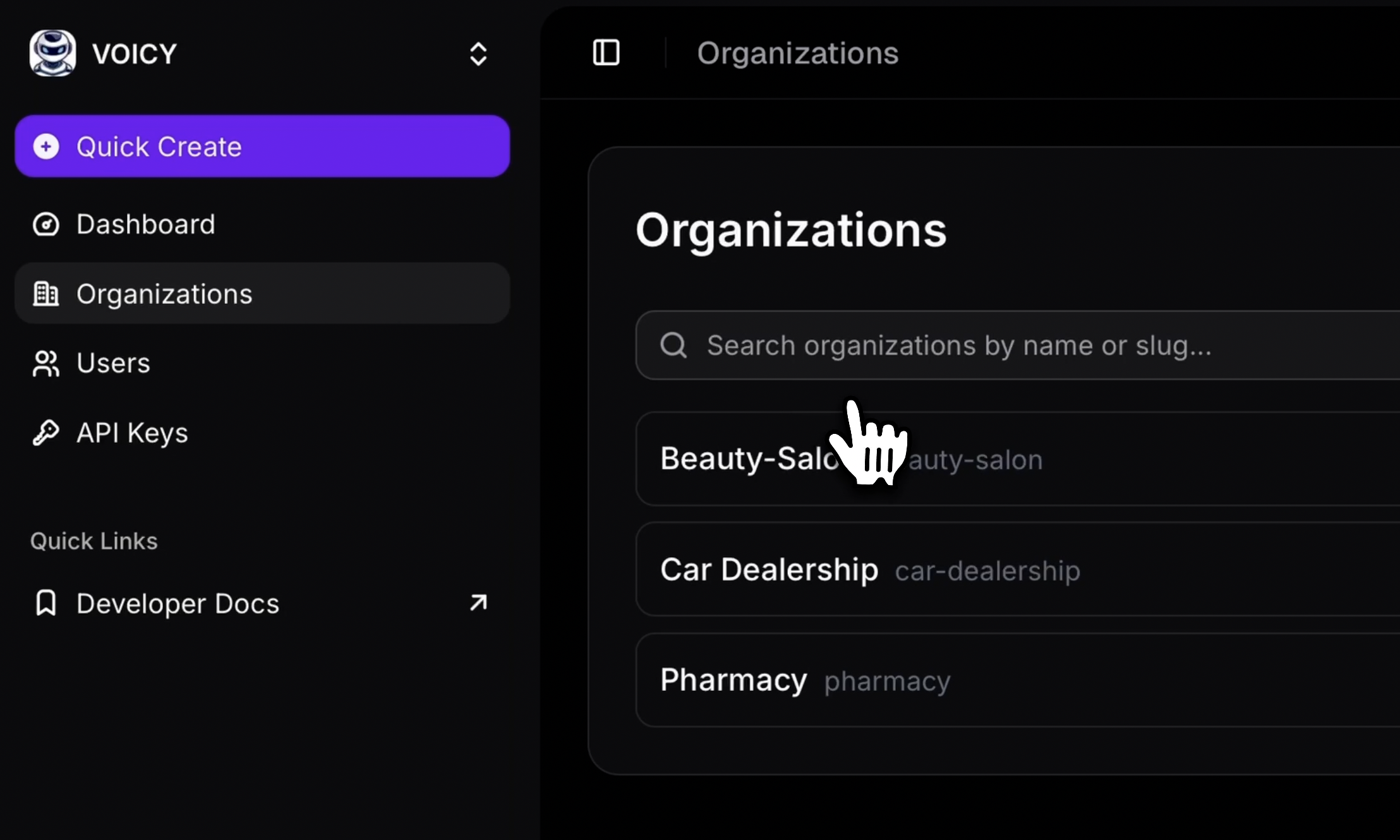
**Organizations** — Create and manage customer workspaces
**Users** — Add users, assign to organizations, monitor calendar connections
**Settings** — Configure OAuth credentials for Google/Outlook
## Quick Tasks
### Create an API Key
API Keys → Create New Key → Copy token
### Add an Organization
Organizations → Create → Set custom slug for your database mapping
### Create a User
Users → Add User → Assign to organizations (optional)
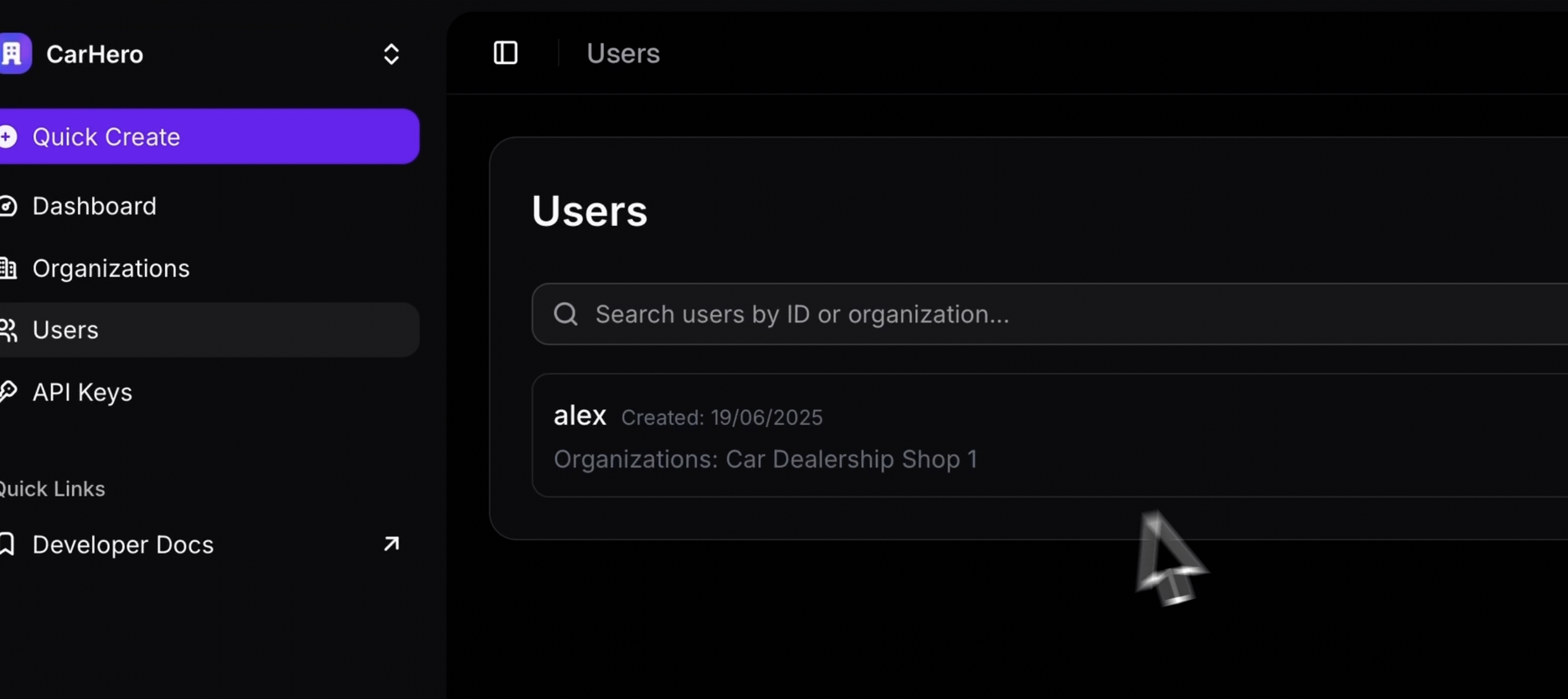
### Configure OAuth
Settings → OAuth Credentials → Add Google/Outlook credentials
See setup guides: [Google](/core/oauth/google) | [Microsoft](/core/oauth/microsoft)
## Best Practices
**Separate Keys** — Use different API keys for dev/staging/production
**Monitor Usage** — Check dashboard regularly to track costs
**Secure Credentials** — Never commit OAuth secrets to version control
## Troubleshooting
**Connection Errors** → Verify OAuth credentials in Settings
**Permission Issues** → Check API key scopes
Need help? Email [team@recal.dev](mailto:team@recal.dev)
## Next Steps
# Core Concepts
URL: /core/entities
***
title: Core Concepts
description: Understand organizations, users, and events—the building blocks of Recal's data model.
icon: Anvil
-----------
## The Basics
**Organizations** — Group users together (optional for B2C, essential for B2B)
**Users** — Connect to calendar providers (Google, Outlook). Support custom IDs.
**Events** — Calendar entries synced across providers
**OAuth Connections** — Secure calendar provider authentication tokens
U
U --> C
C --> E
style O fill:#3b82f6,stroke:#2563eb,stroke-width:2px,color:#fff
style U fill:#8b5cf6,stroke:#7c3aed,stroke-width:2px,color:#fff
style C fill:#ec4899,stroke:#db2777,stroke-width:2px,color:#fff
style E fill:#10b981,stroke:#059669,stroke-width:2px,color:#fff`}
/>
## Data Model
Recal's data model is built around four core entities that work together:
* **Users** connect to calendar providers and can belong to multiple organizations
* **Organizations** group users together for B2B multi-tenancy
* **Events** are calendar entries synced across all providers in a unified format
* **OAuth Connections** securely link users to their Google/Microsoft calendars
For detailed TypeScript type definitions, see the [SDK Types Reference](/sdk/types).
## Architecture Patterns
### B2B Multi-Tenant
Create **organizations** for each customer. Isolates data and enables per-tenant analytics.
**Example:** Salon booking platform
Salon1
Platform --> Salon2
Salon1 --> User1
Salon2 --> User2
style Platform fill:#3b82f6,stroke:#2563eb,stroke-width:2px,color:#fff
style Salon1 fill:#f59e0b,stroke:#d97706,stroke-width:2px,color:#fff
style Salon2 fill:#f59e0b,stroke:#d97706,stroke-width:2px,color:#fff
style User1 fill:#8b5cf6,stroke:#7c3aed,stroke-width:2px,color:#fff
style User2 fill:#8b5cf6,stroke:#7c3aed,stroke-width:2px,color:#fff`}
/>
### B2C Direct Users
Add users directly without **organizations**. Simpler for consumer apps.
**Example:** Personal calendar app
U1
App --> U2
App --> U3
style App fill:#3b82f6,stroke:#2563eb,stroke-width:2px,color:#fff
style U1 fill:#8b5cf6,stroke:#7c3aed,stroke-width:2px,color:#fff
style U2 fill:#8b5cf6,stroke:#7c3aed,stroke-width:2px,color:#fff
style U3 fill:#8b5cf6,stroke:#7c3aed,stroke-width:2px,color:#fff`}
/>
## When to Use What
| Pattern | Use Case | Benefits |
| ----------------- | ------------------------- | ---------------------------------------- |
| **Organizations** | B2B SaaS, team scheduling | Data isolation, per-tenant analytics |
| **Direct Users** | B2C apps, personal tools | Simpler setup, faster onboarding |
| **Hybrid** | Both patterns combined | Flexibility for different customer types |
## Key Features
**Custom IDs** — Map to your database IDs directly (e.g., `${yourDbId}` or `user_clerk-id`)
**Multi-Org Users** — One person can belong to multiple organizations
**Cross-Calendar Sync** — Events stay in sync across Google, Outlook, etc.
**Shared Availability** — Find free slots across organization members
## Next Steps
# Introduction
URL: /core
***
title: Introduction
description: Build calendar integrations with Recal's unified API. Connect Google Calendar, Outlook, and more with a single SDK.
icon: BookOpen
--------------
# Build Calendar Integrations with Recal
Recal is a developer platform for building calendar integrations. One API connects to Google Calendar, Microsoft Outlook, and more—no provider-specific code required.
If you have questions, reach out at [team@recal.dev](mailto:team@recal.dev).
## How It Works
Recal sits between your application and calendar providers:
* **OAuth Integration** → Users connect their calendars through standard flows
* **Unified API** → Your code stays consistent across all providers
## What You Can Build
* **Scheduling Tools** — Find availability across teams and calendars
* **Event Management** — Create, update, and delete calendar events
* **AI Integrations** — Build agents that manage meetings automatically
* **Custom Workflows** — Sync calendar data with your existing systems
All without building provider-specific integrations.
## Getting Started
## AI & LLM Access
These docs are optimized for AI assistants:
| Format | URL | Use |
| --------- | ---------------------------------- | --------------------- |
| Markdown | Any page + `.mdx` | Single page as MDX |
| Full text | [`/llms-full.txt`](/llms-full.txt) | All docs concatenated |
# Quick Start
URL: /core/quick-start
***
title: Quick Start
description: Integrate calendar functionality in 5 minutes with Recal's Node.js SDK.
icon: Rocket
------------
For direct API calls without the SDK, check out the [interactive API reference](https://api.recal.dev/v1/swagger).
## Setup
### 1. Get Your API Key
[Sign up](https://recal.dev/sign-up) → Dashboard → API Keys → Create new key
### 2. Configure OAuth
Dashboard → OAuth Credentials → Add your provider credentials
Need OAuth credentials?
* [Google Calendar setup](/core/oauth/google)
* [Microsoft Outlook setup](/core/oauth/microsoft)
### 3. Install SDK
```bash
npm install recal-sdk
# or: bun add recal-sdk / yarn add recal-sdk
```
### 4. Initialize
```typescript
import { RecalClient } from 'recal-sdk'
const recal = new RecalClient({
token: "YOUR_API_KEY"
})
// Test connection
const orgs = await recal.organizations.listAll()
```
## First Integration
### Create a User
```typescript
const user = await recal.users.create('user_123')
```
### Connect Calendar
```typescript
// Generate OAuth link
const { url } = await recal.oauth.getLink('user_123', 'google')
// Redirect user to `url` → they authorize → callback with code and state
// Verify connection
await recal.oauth.verify(
'google',
code, // from callback
scope, // from callback
state // from callback
)
```
### Read Events
```typescript
const events = await recal.calendar.getEvents(
'user_123',
new Date('2024-01-01'),
new Date('2024-01-31')
)
```
## Next Steps
Need help? Email [team@recal.dev](mailto:team@recal.dev)
# REST API
URL: /core/rest-api
***
title: REST API
description: Authentication and core endpoints. Full reference at api.recal.dev/v1/swagger.
icon: Code
----------
For complete documentation with request/response schemas and interactive testing, visit the **[Swagger UI](https://api.recal.dev/v1/swagger)**.
## Base URL
```
https://api.recal.dev/v1
```
## Authentication
Use your API key in the `Authorization` header:
```bash
curl -H "Authorization: Bearer YOUR_API_KEY" \
https://api.recal.dev/v1/users
```
Generate keys at [dash.recal.dev](https://dash.recal.dev) → API Keys
## Endpoints
### Scheduling
Find availability across users or organizations.
* `GET /v1/users/{userId}/scheduling`
* `GET /v1/organizations/{orgSlug}/scheduling`
### Users
* `GET /v1/users` — List users
* `POST /v1/users` — Create user
* `GET /v1/users/{userId}` — Get details
* `PUT /v1/users/{userId}` — Update
* `DELETE /v1/users/{userId}` — Delete
### Organizations
Create workspaces to group users. Optional for B2C, essential for B2B multi-tenancy.
* `GET /v1/organizations` — List organizations
* `POST /v1/organizations` — Create organization
* `GET /v1/organizations/{orgSlug}` — Get organization details
* `PUT /v1/organizations/{orgSlug}` — Update organization
* `DELETE /v1/organizations/{orgSlug}` — Delete organization
### Calendar
* `GET /v1/users/{userId}/calendar/busy` — User busy periods
* `GET /v1/organizations/{orgSlug}/calendar/busy` — Organization busy periods
### OAuth
Supported: Google Calendar, Microsoft Outlook
* `GET /v1/users/{userId}/oauth` — List connections
* `POST /v1/users/{userId}/oauth/{provider}/authorize` — Start OAuth
* `DELETE /v1/users/{userId}/oauth/{provider}` — Remove connection
#### OAuth Scopes
Recal offers two simplified scope options:
* **`edit`** - Full calendar read/write access (create, update, delete events)
* **`free-busy`** - Read-only access to availability information
When making API calls, Recal automatically validates scopes. If a user lacks required permissions, you'll receive a `403 Forbidden` response:
```json
{
"error": "Insufficient scopes for operation 'calendar.events.insert'. Required scope level: write. You need to request one of these scopes: ...",
"operation": "calendar.events.insert",
"validScopes": [
"https://www.googleapis.com/auth/calendar",
"https://www.googleapis.com/auth/calendar.events"
],
"data": null
}
```
See the [OAuth Setup Guide](/core/oauth) for detailed scope configuration.
## Example Request
```bash
curl -H "Authorization: Bearer YOUR_API_KEY" \
https://api.recal.dev/v1/users
```
## Responses
We're responding in the standardized API format:
```json
{
data: {
// The actual data payload
}
}
// or
{
data: null
error: string
}
```
## Next Steps
# Webhooks
URL: /core/webhooks
***
title: Webhooks
description: Get real-time notifications when calendar events change
icon: Webhook
-------------
import { Callout } from 'fumadocs-ui/components/callout'
import { Tab, Tabs } from 'fumadocs-ui/components/tabs'
Webhook support is actively being built. Google Calendar webhooks are implemented, with Microsoft Outlook coming soon. Our SDK will provide typesafe webhook handlers to make integration seamless.
## What are Webhooks?
Think of webhooks as a notification system for your calendar. Instead of constantly checking if something changed, Recal sends you a message the moment an event is created, updated, or deleted.
**Real-world use cases:**
* Sync calendar events to your CRM in real-time
* Trigger automated workflows when meetings are scheduled
* Update dashboards instantly when availability changes
* Send notifications to your team when events are modified
## How It Works
```mermaid
graph LR
A[Google Calendar] -->|Event Change| B[Recal API]
B -->|Processes & Formats| C[Your Webhook URL]
C -->|Receives Clean Event Data| D[Your Application]
style B fill:#4f46e5,stroke:#4338ca,color:#fff
style A fill:#4285f4,stroke:#1a73e8,color:#fff
```
### What Recal Handles For You
The beauty of Recal's webhook system is that we handle all the complex Google Calendar API interactions so you don't have to.
**Without Recal:**
* Register watch channels with Google Calendar API
* Handle channel expiration (max 30 days)
* Renew channels before they expire
* Parse cryptic notification headers
* Fetch actual event changes using sync tokens
* Handle rate limits and retries
**With Recal:**
* Just provide your webhook URL
* Receive clean, parsed event data
* We handle everything else automatically
## Supported Events
Recal sends notifications for three types of calendar events:
**Triggered when:** A new calendar event is created
**Example payload:**
```json
{
"type": "event.created",
"timestamp": "2024-01-15T10:30:00Z",
"event": {
"id": "evt_1234567890",
"summary": "Team Standup",
"start": "2024-01-16T09:00:00Z",
"end": "2024-01-16T09:30:00Z",
"attendees": ["alice@example.com", "bob@example.com"]
}
}
```
**Triggered when:** An existing calendar event is modified
**Example payload:**
```json
{
"type": "event.updated",
"timestamp": "2024-01-15T10:30:00Z",
"event": {
"id": "evt_1234567890",
"summary": "Team Standup (Rescheduled)",
"start": "2024-01-16T14:00:00Z",
"end": "2024-01-16T14:30:00Z",
"attendees": ["alice@example.com", "bob@example.com"]
},
"changes": ["start", "end", "summary"]
}
```
**Triggered when:** A calendar event is removed
**Example payload:**
```json
{
"type": "event.deleted",
"timestamp": "2024-01-15T10:30:00Z",
"event": {
"id": "evt_1234567890"
}
}
```
## Setting Up Webhooks
### 1. Navigate to Webhooks Settings
In your Recal dashboard, go to **Settings** → **Webhooks** (or navigate to `/[your-org]/webhooks`)
### 2. Add Your Webhook URL
Click **Add Webhook** and provide:
* **Webhook URL**: Your HTTPS endpoint (must use SSL)
* **Event Types**: Select which events you want to receive
Your webhook URL must use HTTPS with a valid SSL certificate. HTTP endpoints are not supported for security reasons.
### 3. Test Your Integration
Once configured, Recal will start sending event notifications to your endpoint. You can view delivery logs and retry failed attempts from the dashboard.
## SDK Integration (Coming Soon)
We're building a typesafe SDK handler to make webhook integration even easier:
```typescript
import { RecalWebhookHandler } from '@recal/sdk'
const handler = new RecalWebhookHandler({
secret: process.env.RECAL_WEBHOOK_SECRET
})
// TypeScript knows the exact event shape!
handler.on('event.created', (event) => {
console.log(`New event: ${event.summary}`)
console.log(`Starts at: ${event.start}`)
})
handler.on('event.updated', (event) => {
console.log(`Updated fields: ${event.changes.join(', ')}`)
})
handler.on('event.deleted', (event) => {
console.log(`Deleted event: ${event.id}`)
})
// Express example
app.post('/webhooks/recal', async (req, res) => {
await handler.handle(req.body, req.headers)
res.sendStatus(200)
})
```
The SDK webhook handler is currently being developed. It will provide automatic signature verification, type safety, and easy event handling. Star our [GitHub repo](https://github.com/recalai/recal) to get notified when it's released!
## Provider Support
📅
Google Calendar
Live
Full webhook support with automatic watch channel management
📧
Microsoft Outlook
Coming Soon
Microsoft Graph API webhook integration in development
## Best Practices
### Respond Quickly
Your webhook endpoint should respond within 5 seconds. If you need to do heavy processing, acknowledge the webhook immediately and process asynchronously:
```typescript
app.post('/webhooks/recal', async (req, res) => {
// Acknowledge immediately
res.sendStatus(200)
// Process asynchronously
processWebhook(req.body).catch(console.error)
})
```
### Handle Idempotency
The same event might be delivered multiple times (e.g., during retries). Use the event ID to ensure you only process each event once:
```typescript
const processedEvents = new Set()
handler.on('event.created', async (event) => {
if (processedEvents.has(event.id)) {
console.log('Already processed, skipping')
return
}
processedEvents.add(event.id)
await saveToDatabase(event)
})
```
### Verify Signatures (Coming Soon)
When the SDK is released, always verify webhook signatures to ensure requests are genuinely from Recal:
```typescript
const handler = new RecalWebhookHandler({
secret: process.env.RECAL_WEBHOOK_SECRET,
verifySignature: true // Recommended for production
})
```
### Monitor Delivery Logs
Use the Recal dashboard to monitor webhook deliveries. You can:
* View successful and failed attempts
* See response codes and error messages
* Manually retry failed deliveries
* Debug payload and response data
## Security Considerations
1. **Use HTTPS Only**: Never expose webhook endpoints over HTTP
2. **Verify Signatures**: Use the SDK's built-in verification (when available)
3. **Validate Payloads**: Always validate incoming data structure
4. **Rate Limit**: Implement rate limiting on your endpoint
5. **Keep Secrets Safe**: Store webhook secrets in environment variables
## Troubleshooting
### Webhooks Not Arriving
1. Check your webhook URL is accessible from the internet
2. Verify your SSL certificate is valid (test with [SSL Labs](https://www.ssllabs.com/ssltest/))
3. Ensure your endpoint returns 2xx status codes
4. Check the delivery logs in the Recal dashboard
### Receiving Duplicate Events
This is normal behavior. Implement idempotency using event IDs to handle duplicates gracefully.
## What's Next?
* **[Dashboard Guide](/core/dashboard)** - Learn how to manage webhooks in the UI
* **[API Reference](https://api.recal.dev/v1/swagger)** - Interactive API documentation
* **[OAuth Setup](/core/oauth/google)** - Connect Google Calendar to receive webhooks
# MCP Advanced Usage
URL: /mcp/advanced
***
title: MCP Advanced Usage
description: Advanced features, presets, and optimization for MCP integration
-----------------------------------------------------------------------------
# MCP Advanced Usage
Advanced configuration and optimization for power users.
## Preset Configuration
Simplify your MCP tools by presetting common values via headers.
### Preset Slot Duration
```javascript
// Set default slot duration
"x-slot-duration": "60" // 60-minute slots
// Tool becomes simpler - no slotDuration parameter needed
{
name: 'get_availability',
arguments: {
startDate: '2024-01-15T09:00:00Z',
endDate: '2024-01-15T17:00:00Z'
// slotDuration preset to 60 minutes
}
}
```
### Preset Attendee Emails
```javascript
// Set default attendees
"x-attendee-emails": "team@company.com,manager@company.com"
// Booking tool becomes simpler
{
name: 'create_booking',
arguments: {
startTime: '2024-01-15T14:00:00Z',
endTime: '2024-01-15T15:00:00Z',
title: 'Team Meeting'
// attendeeEmails preset from header
}
}
```
## Multi-Calendar Handling
When users have multiple calendars (Google + Microsoft):
* **Availability**: Checks all calendars for conflicts
* **Booking**: Creates events in primary calendar of each provider
* **Conflicts**: Respects busy times across all providers
## Timezone Best Practices
```javascript
// Always set timezone header
"x-timezone": "America/New_York"
// Handles edge cases:
// - Daylight saving transitions
// - Cross-timezone scheduling
// - Invalid timezone fallback to UTC
```
## Header Precedence
When both headers and parameters are provided:
| Setting | Rule |
| --------------- | -------------------------- |
| Slot Duration | Parameter overrides header |
| Attendee Emails | Header takes precedence |
| Timezone | Header always used |
## Performance Optimization
```javascript
// Optimal slot durations
slotDuration: 30 // Good balance of granularity and performance
slotDuration: 15 // High granularity, slower
slotDuration: 60 // Fast, less granular
// Reasonable date ranges
const tomorrow = new Date();
tomorrow.setDate(tomorrow.getDate() + 1);
const endOfWeek = new Date();
endOfWeek.setDate(endOfWeek.getDate() + 7);
```
## Error Handling
```javascript
server.setRequestHandler('tools/call', async (request) => {
try {
const response = await fetch('https://mcp.recal.dev/', {
// ... config
});
const result = await response.json();
// Check for errors in response
if (result.result?.content?.[0]?.text?.includes('error')) {
throw new Error(result.result.content[0].text);
}
return result.result;
} catch (error) {
// Return user-friendly error
return {
content: [{
type: 'text',
text: `Calendar error: ${error.message}`
}]
};
}
});
```
## Real-World Examples
### Enterprise Setup
```javascript
// Enterprise MCP server with presets
const enterpriseConfig = {
env: {
RECAL_API_KEY: process.env.RECAL_API_KEY,
RECAL_ORG_ID: process.env.RECAL_ORG_ID,
RECAL_USER_ID: process.env.RECAL_USER_ID,
RECAL_TIMEZONE: "America/New_York"
},
headers: {
"x-slot-duration": "30",
"x-attendee-emails": "team@company.com,hr@company.com",
"x-timezone": "America/New_York"
}
};
```
### Dynamic User Context
```javascript
// Switch users based on context
server.setRequestHandler('tools/call', async (request) => {
const userId = request.params.arguments.userId || process.env.RECAL_USER_ID;
const response = await fetch('https://mcp.recal.dev/', {
headers: {
'Authorization': `Bearer ${process.env.RECAL_API_KEY}`,
'x-organization-id': process.env.RECAL_ORG_ID,
'x-user-id': userId, // Dynamic user switching
'x-timezone': getUserTimezone(userId)
},
// ... rest of config
});
});
```
## SSE Alternative
For streaming responses, use the SSE endpoint:
```javascript
// Use SSE for real-time updates
const response = await fetch('https://mcp.recal.dev/sse', {
headers: {
'Accept': 'text/event-stream',
// ... other headers
}
});
```
## Next Steps
# AI Calendar Assistant
URL: /mcp
***
title: AI Calendar Assistant
description: Let AI assistants manage your calendar automatically
-----------------------------------------------------------------
# AI Calendar Assistant
Give AI assistants like Claude direct access to your calendar system. They can check availability, schedule meetings, and manage bookings automatically.
## Why Use This?
**Instead of manually checking calendars and scheduling:**
* ❌ "Let me check my calendar... I'm free Tuesday at 2pm"
* ❌ "Can you send me a calendar invite for that meeting?"
* ❌ "I need to reschedule, let me find another time..."
**Let AI handle it automatically:**
* ✅ "Schedule a 1-hour team meeting next week" → AI finds time and creates event
* ✅ "When am I free for a client call?" → AI checks all calendars instantly
* ✅ "Book a follow-up meeting for next Friday" → AI schedules with attendees
## Perfect For
* **Teams**: Let AI coordinate meeting scheduling across multiple calendars
* **Consultants**: AI handles client appointment booking automatically
* **Executives**: AI manages complex scheduling with multiple stakeholders
* **Customer Success**: AI books demos and follow-ups seamlessly
## What Your AI Assistant Can Do
| Task | Before | After |
| -------------------- | -------------------------- | --------------------------------------------- |
| Check availability | Manual calendar review | "I'm free Tuesday 2-3pm and Thursday 10-11am" |
| Schedule meetings | Back-and-forth emails | AI books meeting and sends invites |
| Find team slots | Coordinate multiple people | AI finds common availability instantly |
| Reschedule conflicts | Manual rebooking | AI suggests alternatives and updates |
## Prerequisites
You need:
1. **Recal account** with API key
2. **Connected calendars** (Google/Microsoft)
3. **AI assistant** (Claude Desktop, VS Code, etc.)
**Important**: Users must connect their calendars first. Without calendar connections, you'll get `"User has no connected calendars"` errors.
## How It Works
1. **Connect**: Your AI assistant connects to Recal's calendar system
2. **Ask**: You ask the AI to check availability or schedule meetings
3. **Act**: AI automatically handles calendar operations and responds
## Real Examples
**You**: "Do I have any free time tomorrow afternoon?"
**AI**: "Yes, you're free from 2-4pm and 4:30-6pm tomorrow."
**You**: "Schedule a 30-minute client demo for next Tuesday at 3pm"
**AI**: "I've scheduled 'Client Demo' for Tuesday Jan 16 at 3:00-3:30pm and invited [client@example.com](mailto:client@example.com)."
## Quick Setup
**What you'll get:**
* AI can check your calendar availability
* AI can schedule meetings automatically
* AI can coordinate with multiple calendars
## Need Help?
# MCP Quick Start
URL: /mcp/quick-start
***
title: MCP Quick Start
description: Get Recal MCP integration working in 5 minutes
-----------------------------------------------------------
# MCP Quick Start
Get your AI assistant connected to Recal's calendar system in 5 minutes.
## Step 1: Get Your Credentials
1. **Log in** to your Recal Dashboard
2. **Navigate** to "API Keys" → "Create New API Key"
3. **Copy** your API key (keep it secure!)
4. **Note** your Organization ID from dashboard settings
## Step 2: Create MCP Server
Create `recal-mcp-server.js`:
```javascript
import { Server } from '@modelcontextprotocol/sdk/server/index.js';
import { StdioServerTransport } from '@modelcontextprotocol/sdk/server/stdio.js';
const server = new Server({
name: 'recal-calendar',
version: '1.0.0',
}, {
capabilities: { tools: {} }
});
// Tool definitions
server.setRequestHandler('tools/list', async () => ({
tools: [
{
name: 'get_availability',
description: 'Get calendar availability',
inputSchema: {
type: 'object',
properties: {
startDate: { type: 'string', format: 'date-time' },
endDate: { type: 'string', format: 'date-time' },
slotDuration: { type: 'number', default: 30 }
},
required: ['startDate', 'endDate']
}
},
{
name: 'create_booking',
description: 'Create a calendar booking',
inputSchema: {
type: 'object',
properties: {
startTime: { type: 'string', format: 'date-time' },
endTime: { type: 'string', format: 'date-time' },
title: { type: 'string' },
description: { type: 'string' },
attendeeEmails: { type: 'array', items: { type: 'string' } }
},
required: ['startTime', 'endTime', 'title', 'attendeeEmails']
}
}
]
}));
// Tool execution
server.setRequestHandler('tools/call', async (request) => {
const { name, arguments: args } = request.params;
const response = await fetch('https://mcp.recal.dev/', {
method: 'POST',
headers: {
'Content-Type': 'application/json',
'Authorization': `Bearer ${process.env.RECAL_API_KEY}`,
'x-organization-id': process.env.RECAL_ORG_ID,
'x-user-id': process.env.RECAL_USER_ID,
'x-timezone': process.env.RECAL_TIMEZONE || 'UTC'
},
body: JSON.stringify({
jsonrpc: '2.0',
id: 1,
method: 'tools/call',
params: { name, arguments: args }
})
});
const result = await response.json();
return result.result;
});
const transport = new StdioServerTransport();
await server.connect(transport);
```
## Step 3: Configure Claude Desktop
Add to your `claude_desktop_config.json`:
```json
{
"mcpServers": {
"recal-calendar": {
"command": "node",
"args": ["/path/to/recal-mcp-server.js"],
"env": {
"RECAL_API_KEY": "your_api_key_here",
"RECAL_ORG_ID": "your_org_id",
"RECAL_USER_ID": "your_user_id",
"RECAL_TIMEZONE": "America/New_York"
}
}
}
}
```
## Step 4: Test It
Restart Claude Desktop and try:
> "Check my availability for tomorrow 9am to 5pm"
> "Schedule a 30-minute team meeting for next Tuesday at 2pm"
## Expected Responses
**Availability Check:**
```json
[
{"start": "2024-01-15T09:00:00-05:00", "end": "2024-01-15T09:30:00-05:00"},
{"start": "2024-01-15T10:00:00-05:00", "end": "2024-01-15T10:30:00-05:00"}
]
```
**Booking Creation:**
```json
{
"success": true,
"eventId": "evt_abc123",
"title": "Team Meeting",
"start": "2024-01-15T14:00:00-05:00",
"end": "2024-01-15T14:30:00-05:00"
}
```
## Common First-Time Issues
**"User has no connected calendars"**
* Complete OAuth setup in Recal Dashboard
* Have users connect Google/Microsoft calendars
**"User not found"**
* Check `RECAL_USER_ID` is the custom user ID (not internal ID)
* Verify user exists in your organization
**Connection fails**
* Verify API key and organization ID
* Check network connectivity to `https://mcp.recal.dev/`
## Next Steps
# MCP Troubleshooting
URL: /mcp/troubleshooting
***
title: MCP Troubleshooting
description: Solutions for common MCP integration issues
--------------------------------------------------------
# MCP Troubleshooting
Quick solutions for common MCP integration problems.
## "User has no connected calendars"
**Problem**: User hasn't connected their Google/Microsoft calendar
**Solution**:
1. Verify OAuth credentials in Recal Dashboard
2. User completes OAuth: `POST /v1/users/{userId}/oauth/{provider}/link`
3. Check status: `GET /v1/users/{userId}/oauth/{provider}`
## "User not found"
**Problem**: Invalid user ID or user doesn't exist
**Solution**:
1. Use custom user ID (not internal database ID)
2. Verify user exists: `GET /v1/users`
3. Check user belongs to organization in `x-organization-id`
## "Permission denied"
**Problem**: API key lacks required permissions
**Solution**:
1. Check API key permissions in Recal Dashboard
2. Ensure READ permission for `get_availability`
3. Ensure BOOK permission for `create_booking`
## MCP Connection Failed
**Problem**: Can't connect to MCP server
**Solution**:
1. Test endpoint: `curl -H "Authorization: Bearer YOUR_KEY" https://mcp.recal.dev/`
2. Check environment variables are set
3. Verify API key is valid and not expired
## Invalid Date Format
**Problem**: Date parameters rejected
**Solution**:
1. Use ISO 8601 format: `2024-01-15T10:00:00Z`
2. Include timezone: `2024-01-15T10:00:00-05:00`
3. Ensure end time is after start time
## Debug Your Setup
Add logging to your MCP server:
```javascript
server.setRequestHandler('tools/call', async (request) => {
console.log('Request:', JSON.stringify(request, null, 2));
try {
const response = await fetch('https://mcp.recal.dev/', {
// ... your config
});
const result = await response.json();
console.log('Response:', JSON.stringify(result, null, 2));
return result.result;
} catch (error) {
console.error('Error:', error);
throw error;
}
});
```
## Still Having Issues?
* **Check** [REST API docs](/rest-api) for calendar setup
* **Review** [OAuth documentation](/rest-api/endpoints/users/userid/oauth)
* **Contact** [team@recal.dev](mailto:team@recal.dev)
# Google Setup
URL: /core/oauth/google
***
title: Google Setup
description: Connect Google Calendar to Recal
---------------------------------------------
Jump to [Enable the Calendar API](#2-enable-the-google-calendar-api), [Configure Consent Screen](#3-configure-oauth-consent-screen), or [Add to Recal](#6-add-to-recal).
### 1. Create Google Cloud Project
Go to [Google Cloud Console](https://console.cloud.google.com/) → Project selector → **New Project**.
### 2. Enable the Google Calendar API
Search **"Google Calendar API"** → Click **Enable**.
### 3. Configure OAuth Consent Screen
**APIs & Services** → **OAuth consent screen**:
* **User Type**: "External" (SaaS) or "Internal" (org-only)
* Fill required fields: app name, support email, developer email
* Click through remaining steps
**Testing mode**: Tokens expire in \~7 days. **Production mode**: No fixed expiry. Move to Production before launch. [Slack us](https://recal.dev/slack) for help.
### 4. Understanding Scopes in Recal
Recal simplifies OAuth scope management by offering easy-to-understand scope options that automatically map to the appropriate Google Calendar permissions:
#### Available Scopes
**`write` scope** - Read/write access to events (or deprecated `edit`)
* `https://www.googleapis.com/auth/userinfo.email` - User's email address
* `https://www.googleapis.com/auth/calendar.events` - Read/write access to events
* `https://www.googleapis.com/auth/calendar.readonly` - Read-only access to calendar list (no calendar modifications)
**`read` scope** - Read-only access to calendars and events
* `https://www.googleapis.com/auth/userinfo.email` - User's email address
* `https://www.googleapis.com/auth/calendar.readonly` - Read-only calendar and event access
**`free-busy` scope** - Read-only access to availability
* `https://www.googleapis.com/auth/userinfo.email` - User's email address
* `https://www.googleapis.com/auth/calendar.freebusy` - Busy time information only
Request minimum scopes needed. Insufficient access returns `403` with required permissions — re-authenticate with higher scope.
### 5. Create OAuth Credentials
**APIs & Services** → **Credentials** → **+ Create Credentials** → **OAuth client ID**:
* Application type: **Web application**
* **Authorized JavaScript origins**: `https://yourapp.com`
* **Authorized redirect URIs**: `https://yourapp.com/oauth2callback`
* Click **Create** and copy **Client ID** + **Client Secret**
### 6. Add to Recal
In Recal dashboard → **OAuth Credentials** → Add Client ID, Client Secret, and redirect URL.
Redirect URL in Recal must exactly match the URI in Google Cloud Console.
# Overview
URL: /core/oauth
***
title: Overview
description: Connect calendar providers to Recal
------------------------------------------------
Connect your OAuth app so Recal can access users' calendars. Pick your provider:
***
## Reference
### Scopes
| Scope | Access |
| ----------- | ------------------------------- |
| `write` | Read/write calendars and events |
| `read` | Read-only calendars and events |
| `free-busy` | Availability info only |
Requires users to re-authenticate. Plan before launch.
### Redirect URLs
Configure your **production** URL in the Recal dashboard.
* Must match **exactly** in both Recal and your OAuth provider
* Dev/staging: override with `?redirectUrl=http://localhost:3000/callback`
# Microsoft Setup
URL: /core/oauth/microsoft
***
title: Microsoft Setup
description: Connect Outlook Calendar to Recal
----------------------------------------------
Jump to [Configure API Permissions](#2-configure-api-permissions), [Get Credentials](#3-obtain-client-id-and-secret), or [Add to Recal](#5-add-to-recal).
### 1. Register Application in Azure
Go to [Azure Portal](https://portal.azure.com/) → Search **"App registrations"** → **+ New registration**:
* **Display name**: Your app name
* **Supported account types**: "Any organizational directory + personal accounts" (SaaS) or "This org only" (internal)
* **Redirect URI**: Web → `https://yourapp.com/auth/callback`
* Click **Register**
### 2. Configure API Permissions
**API permissions** → **+ Add a permission** → **Microsoft Graph** → **Delegated permissions**:
* Add Calendar permissions (see [Scopes](#4-understanding-scopes-in-recal) below)
* For org apps: **Grant admin consent**
### 3. Obtain Client ID and Secret
* **Client ID**: Overview page → Application (client) ID
* **Client Secret**: Certificates & secrets → + New client secret → Copy **Value** immediately (shown once)
### 4. Microsoft Scopes
Recal maps to these Microsoft Graph permissions:
**`write` scope** - Read/write access to events
* `User.Read` - User's basic profile information
* `Calendars.ReadWrite` - Read/write access to calendars and events
* `Calendars.ReadWrite.Shared` - Read/write access to shared calendars
**`read` scope** - Read-only access to calendars and events
* `User.Read` - User's basic profile information
* `Calendars.Read` - Read-only access to calendars and events
**`free-busy` scope** - Read-only access to availability
* Same as `read` scope (Microsoft has no separate free-busy permission)
Request minimum scopes needed. Insufficient access returns `403` — re-authenticate with higher scope.
### 5. Add to Recal
In Recal dashboard → **OAuth Credentials** → Add Client ID, Client Secret, and redirect URL to Microsoft card.
Redirect URL in Recal must exactly match the URI in Azure.
# Error Handling
URL: /sdk/javascript/error-handling
***
title: Error Handling
description: Handle errors and exceptions in the Recal SDK.
icon: TriangleAlert
-------------------
## Understanding Error Handling
The Recal SDK provides a comprehensive error handling system through the `RecalError` class. All SDK methods throw typed errors that you can catch and handle appropriately in your application.
***
## RecalError Class
The SDK uses a custom `RecalError` class that extends the native JavaScript `Error` with additional properties:
```typescript
class RecalError extends Error {
statusCode?: number // HTTP status code (404, 400, 500, etc.)
details?: unknown // Additional error details from the API
}
```
***
## Basic Error Handling
Wrap SDK calls in try-catch blocks to handle errors:
```typescript
import { Recal, RecalError } from 'recal-sdk'
const recal = new Recal({ token: process.env.RECAL_TOKEN })
try {
const user = await recal.users.get('user_123')
console.log('User found:', user)
} catch (error) {
if (error instanceof RecalError) {
console.error('Recal API Error:', error.message)
console.error('Status Code:', error.statusCode)
console.error('Details:', error.details)
} else {
console.error('Unexpected error:', error)
}
}
```
***
## Common Error Status Codes
### 400 Bad Request
Invalid request parameters or missing required fields.
```typescript
try {
await recal.events.createEvent('user_id', 'google', 'primary', {
subject: 'Meeting',
// Missing required 'start' and 'end' fields
})
} catch (error) {
if (error instanceof RecalError && error.statusCode === 400) {
console.error('Invalid request:', error.message)
// Handle validation errors
}
}
```
### 401 Unauthorized
Invalid or missing API token.
```typescript
const recal = new Recal({ token: 'invalid_token' })
try {
await recal.users.list()
} catch (error) {
if (error instanceof RecalError && error.statusCode === 401) {
console.error('Authentication failed - check your API token')
// Prompt user to re-authenticate or check token
}
}
```
### 404 Not Found
Resource doesn't exist (user, organization, event, etc.).
```typescript
try {
await recal.users.get('nonexistent_user')
} catch (error) {
if (error instanceof RecalError && error.statusCode === 404) {
console.error('User not found')
// Handle missing resource
}
}
```
### 429 Too Many Requests
Rate limit exceeded.
```typescript
try {
await recal.calendar.listEvents('user_id', {
start: '2024-01-01T00:00:00Z',
end: '2024-12-31T23:59:59Z'
})
} catch (error) {
if (error instanceof RecalError && error.statusCode === 429) {
console.error('Rate limit exceeded - please retry later')
// Implement exponential backoff
}
}
```
### 500 Internal Server Error
Server-side error.
```typescript
try {
await recal.oauth.verifyCode('google', { code: 'auth_code', state: 'state' })
} catch (error) {
if (error instanceof RecalError && error.statusCode === 500) {
console.error('Server error - please try again')
// Log error and notify monitoring system
}
}
```
***
## Error Handling Patterns
### Centralized Error Handler
Create a reusable error handler for consistent error handling:
```typescript
function handleRecalError(error: unknown, context: string) {
if (error instanceof RecalError) {
console.error(`[${context}] Recal API Error:`, {
message: error.message,
statusCode: error.statusCode,
details: error.details
})
// Handle specific status codes
switch (error.statusCode) {
case 400:
return { error: 'Invalid request', retry: false }
case 401:
return { error: 'Authentication failed', retry: false }
case 404:
return { error: 'Resource not found', retry: false }
case 429:
return { error: 'Rate limit exceeded', retry: true }
case 500:
return { error: 'Server error', retry: true }
default:
return { error: 'Unknown error', retry: false }
}
}
console.error(`[${context}] Unexpected error:`, error)
return { error: 'Unexpected error', retry: false }
}
// Usage
try {
await recal.users.create('user_123')
} catch (error) {
const result = handleRecalError(error, 'User Creation')
if (result.retry) {
// Implement retry logic
}
}
```
### Retry with Exponential Backoff
Handle transient errors with automatic retries:
```typescript
async function withRetry(
fn: () => Promise,
maxRetries = 3,
initialDelay = 1000
): Promise {
let lastError: Error
for (let attempt = 0; attempt < maxRetries; attempt++) {
try {
return await fn()
} catch (error) {
lastError = error as Error
// Only retry on specific errors
if (error instanceof RecalError) {
const shouldRetry = [429, 500, 503].includes(error.statusCode || 0)
if (!shouldRetry || attempt === maxRetries - 1) {
throw error
}
const delay = initialDelay * Math.pow(2, attempt)
console.log(`Retrying in ${delay}ms (attempt ${attempt + 1}/${maxRetries})`)
await new Promise(resolve => setTimeout(resolve, delay))
} else {
throw error
}
}
}
throw lastError!
}
// Usage
const user = await withRetry(() => recal.users.get('user_123'))
```
### Graceful Degradation
Handle errors gracefully without breaking your application:
```typescript
async function getUserCalendars(userId: string) {
try {
return await recal.calendar.list(userId)
} catch (error) {
if (error instanceof RecalError) {
console.warn('Failed to fetch calendars:', error.message)
return [] // Return empty array as fallback
}
throw error
}
}
```
***
## Best Practices
1. **Always Use Try-Catch**: Wrap all SDK calls in try-catch blocks
2. **Check Error Types**: Use `instanceof RecalError` to identify SDK errors
3. **Log Error Details**: Include `statusCode` and `details` in logs for debugging
4. **Handle Specific Codes**: Implement different logic for different status codes
5. **Implement Retries**: Retry transient errors (429, 500) with exponential backoff
6. **User-Friendly Messages**: Convert technical errors to user-friendly messages
7. **Monitor Errors**: Track error rates and patterns in your monitoring system
8. **Validate Input**: Catch validation errors early before making API calls
***
## Type Safety
TypeScript provides type checking for error handling:
```typescript
import { Recal, RecalError } from 'recal-sdk'
async function safeUserFetch(userId: string) {
const recal = new Recal({ token: process.env.RECAL_TOKEN })
try {
const user = await recal.users.get(userId)
return { success: true, data: user }
} catch (error) {
// Type guard ensures proper error handling
if (error instanceof RecalError) {
return {
success: false,
error: error.message,
statusCode: error.statusCode
}
}
return { success: false, error: 'Unknown error' }
}
}
```
***
## Related
* See [Users](/sdk/javascript/users) for user-specific operations
* See [Events](/sdk/javascript/events) for event-specific operations
* See [OAuth](/sdk/javascript/oauth) for OAuth-specific error handling
# Events
URL: /sdk/javascript/events
***
title: Events
description: Create, read, update, and delete calendar events.
icon: Calendar
--------------
## Understanding Event Operations
The Events API provides comprehensive event management across multiple calendar providers.
Whether you need to create a single event in a specific calendar or synchronize events across all connected providers,
this API handles the complexity of working with Google Calendar and Microsoft Outlook.
### Key Concepts:
**Provider-Specific Events**: Individual calendar entries created, read, updated, or deleted in a specific calendar (Google or Microsoft).
**Meta Events**: Unified calendar entries that are created, updated, or deleted across **all** connected calendar providers simultaneously, ensuring perfect synchronization.
***
## Provider-Specific Operations
Use these methods when you need to interact with a specific calendar provider.
**Note:** To list/query existing events, see [Calendar & Availability](/sdk/javascript/free-busy#list-events).
### Create Event
```typescript
const event = await recal.events.createEvent(
'user_id',
'google',
'primary',
{
subject: 'Team Meeting',
description: 'Weekly sync',
start: '2024-01-15T10:00:00Z',
end: '2024-01-15T11:00:00Z',
attendees: [
{ email: 'colleague@company.com' }
],
meeting: true // Automatically creates Google Meet/Teams link
}
)
console.log(event.id) // Provider-specific event ID
console.log(event.meeting?.url) // Meeting link if meeting: true
```
### Get Event
```typescript
// Get an existing event from a specific calendar
const event = await recal.events.getEvent(
'user_id',
'google',
'primary',
'event_id'
)
```
### Update Event
```typescript
// Update an existing event in a specific calendar
const updated = await recal.events.updateEvent(
'user_id',
'google',
'primary',
'event_id',
{
subject: 'Updated Meeting Title',
description: 'Updated description',
start: '2024-01-15T11:00:00Z',
end: '2024-01-15T12:00:00Z'
}
)
```
### Delete Event
```typescript
// Delete an event from a specific calendar
await recal.events.deleteEvent(
'user_id',
'google',
'primary',
'event_id'
)
```
***
## Cross-Calendar Operations (Meta Events)
Meta events provide powerful cross-platform synchronization, ensuring events appear across all connected calendar providers simultaneously.
### Create Meta Event
```typescript
// Create event across ALL connected calendars (default behavior)
const metaEvent = await recal.events.createMetaEvent(
'user_id',
{
subject: 'Cross-platform Meeting',
start: '2024-01-20T15:00:00Z',
end: '2024-01-20T16:00:00Z',
attendees: [
{ email: 'team@example.com' }
],
meeting: true
}
)
console.log(metaEvent.metaId) // Unique ID across all providers
// Or specify which providers to use
const metaEventSpecific = await recal.events.createMetaEvent(
'user_id',
{
subject: 'Selective Sync Meeting',
start: '2024-01-20T15:00:00Z',
end: '2024-01-20T16:00:00Z'
},
{
provider: ['google', 'microsoft'], // Only these providers
sendNotifications: true // Send email notifications
}
)
```
### Get Meta Event
```typescript
// Retrieve event data from all connected calendars
const metaEvent = await recal.events.getMetaEvent(
'user_id',
'meta_id_123'
)
// Or filter by provider
const metaEventFiltered = await recal.events.getMetaEvent(
'user_id',
'meta_id_123',
{
provider: ['google']
}
)
```
### Update Meta Event
```typescript
// Update across ALL connected calendars
await recal.events.updateMetaEvent(
'user_id',
'meta_id_123',
{
subject: 'Updated Cross-Platform Title',
start: '2024-01-20T16:00:00Z',
end: '2024-01-20T17:00:00Z'
}
)
// Or update with options
await recal.events.updateMetaEvent(
'user_id',
'meta_id_123',
{
subject: 'Updated Title'
},
{
provider: ['microsoft'], // Only update Microsoft calendars
sendNotifications: false
}
)
```
### Delete Meta Event
```typescript
// Delete from ALL connected calendars
await recal.events.deleteMetaEvent(
'user_id',
'meta_id_123'
)
// Or delete selectively
await recal.events.deleteMetaEvent(
'user_id',
'meta_id_123',
{
provider: ['google'] // Only delete from Google calendars
}
)
```
***
## Event Properties
All events support the following properties:
```typescript
interface CreateEvent {
subject?: string // Event title
description?: string // Event description (HTML supported)
start: string // ISO 8601 timestamp
end: string // ISO 8601 timestamp
location?: string // Location or address
attendees?: Attendee[] // Array of { email: string }
meeting?: boolean // Auto-create meeting link (Google Meet/Teams)
}
```
***
## Best Practices
1. **Use Meta Events for Sync**: When users have multiple calendars, use meta events to keep them synchronized
2. **Include Meeting Links**: Set `meeting: true` to automatically create Google Meet or Teams links
3. **Handle Timezones**: Always use ISO 8601 format with timezone information
4. **Validate Attendees**: Ensure email addresses are valid before creating events
5. **Check OAuth Permissions**: Ensure users have granted `edit` scope for write operations
***
## Related
* See [Error Handling](/sdk/javascript/error-handling) for handling SDK errors
* See [Calendar & Availability](/sdk/javascript/free-busy) for querying events
* See [OAuth](/sdk/javascript/oauth) for managing calendar connections
# Calendar & Availability
URL: /sdk/javascript/free-busy
***
title: Calendar & Availability
description: Query calendars, events, and busy times.
icon: CalendarSearch
--------------------
## Understanding Calendar Queries
The Calendar API provides read-only access to user calendars and availability information across multiple providers.
Use these methods to list calendars, query events, and check busy times for scheduling applications.
***
## List Calendars
Get all calendars connected to a user across their calendar providers.
```typescript
// List all calendars
const calendars = await recal.calendar.list('user_id')
// Filter by provider
const googleCalendars = await recal.calendar.list('user_id', {
provider: 'google'
})
const microsoftCalendars = await recal.calendar.list('user_id', {
provider: 'microsoft'
})
```
Each calendar includes:
* `id`: Provider-specific calendar ID
* `name`: Calendar display name
* `primary`: Whether this is the user's primary calendar
* `backgroundColor`: Calendar color
* `timeZone`: Calendar timezone (e.g., "America/New\_York")
* `accessRole`: User's access level (`owner`, `writer`, `reader`, `freeBusyReader`)
***
## List Events
Retrieve events from a user's calendars within a date range.
```typescript
// List all events in a date range
const events = await recal.calendar.listEvents('user_id', {
start: '2024-01-01T00:00:00Z',
end: '2024-01-31T23:59:59Z'
})
// Filter by provider
const googleEvents = await recal.calendar.listEvents('user_id', {
start: '2024-01-01T00:00:00Z',
end: '2024-01-31T23:59:59Z',
provider: 'google'
})
// Specify timezone for results
const eventsInET = await recal.calendar.listEvents('user_id', {
start: '2024-01-01T00:00:00Z',
end: '2024-01-31T23:59:59Z',
provider: ['google', 'microsoft'],
timeZone: 'America/New_York'
})
```
**Parameters:**
* `start` (required): ISO 8601 timestamp for range start
* `end` (required): ISO 8601 timestamp for range end
* `provider` (optional): Filter by `'google'`, `'microsoft'`, or array `['google', 'microsoft']`
* `timeZone` (optional): Return results in specific timezone
***
## Get Busy Times
Query when a user is busy/unavailable based on their calendar events.
```typescript
// Get busy times across all calendars
const busyTimes = await recal.calendar.getBusyTimes('user_id', {
start: '2024-01-15T00:00:00Z',
end: '2024-01-20T23:59:59Z'
})
// Filter by provider
const busyGoogle = await recal.calendar.getBusyTimes('user_id', {
start: '2024-01-15T00:00:00Z',
end: '2024-01-20T23:59:59Z',
provider: 'google'
})
// Check multiple providers
const busyAll = await recal.calendar.getBusyTimes('user_id', {
start: '2024-01-15T00:00:00Z',
end: '2024-01-20T23:59:59Z',
provider: ['google', 'microsoft'],
timeZone: 'America/Los_Angeles'
})
```
**Parameters:**
* `start` (required): ISO 8601 timestamp for range start
* `end` (required): ISO 8601 timestamp for range end
* `provider` (optional): Filter by provider(s)
* `timeZone` (optional): Return results in specific timezone
**Response Format:**
```typescript
[
{
start: '2024-01-15T10:00:00Z',
end: '2024-01-15T11:00:00Z'
},
{
start: '2024-01-15T14:00:00Z',
end: '2024-01-15T15:30:00Z'
}
]
```
***
## Use Cases
### Check User Availability
```typescript
async function isUserAvailable(userId: string, start: string, end: string) {
const busyTimes = await recal.calendar.getBusyTimes(userId, {
start,
end
})
// User is available if no busy times found
return busyTimes.length === 0
}
```
### Display User's Calendars
```typescript
async function displayCalendars(userId: string) {
const calendars = await recal.calendar.list(userId)
for (const calendar of calendars) {
console.log(`${calendar.name} (${calendar.provider})`)
console.log(` Timezone: ${calendar.timeZone}`)
console.log(` Access: ${calendar.accessRole}`)
}
}
```
### Aggregate Events Across Providers
```typescript
async function getAllUpcomingEvents(userId: string) {
const now = new Date()
const nextMonth = new Date(now.getTime() + 30 * 24 * 60 * 60 * 1000)
const events = await recal.calendar.listEvents(userId, {
start: now.toISOString(),
end: nextMonth.toISOString()
})
// Sort by start time
return events.sort((a, b) =>
new Date(a.start).getTime() - new Date(b.start).getTime()
)
}
```
***
## Best Practices
1. **Use Appropriate Date Ranges**: Query only the time periods you need to minimize API load
2. **Filter by Provider**: If you only need one provider's data, filter to reduce response size
3. **Handle Timezones**: Always specify timezone when displaying times to users
4. **Cache Responses**: Calendar data doesn't change frequently - consider caching results
5. **Use Busy Times for Scheduling**: For scheduling, use `getBusyTimes()` instead of fetching full events
***
## Related
* See [Events](/sdk/javascript/events) for creating, updating, and deleting events
* See [Scheduling](/sdk/javascript/scheduling) for finding available time slots
* See [Organizations](/sdk/javascript/organizations) for team-wide availability queries
# Introduction
URL: /sdk/javascript
***
title: Introduction
description: "Start integrating Recal's API with TypeScript"
------------------------------------------------------------
# Getting Started
The Recal JavaScript SDK is an open-source software development kit for interacting with the Recal API using JavaScript and TypeScript. Build sophisticated calendar integrations with support for Google Calendar and Microsoft Outlook.
Security note: This SDK is designed for server-side use. Never expose your API token in client-side code.
***
## Features
* **Multi-Provider Support**: Seamlessly work with Google Calendar and Microsoft Outlook
* **Type Safety**: Full TypeScript support with runtime validation
* **Rich Calendar Operations**: Events, busy queries, scheduling, and more
* **Organization Management**: Handle organization and user calendars
* **OAuth Integration**: Built-in OAuth flow support for calendar connections
* **Error Handling**: Comprehensive error types for robust applications
* **Modern Architecture**: Clean, testable service-based design
***
## Setup
### Create an Account & Get API Key
1. [Sign up](https://dash.recal.dev/sign-up) for a Recal account
2. Log in to your [Recal dashboard](https://dash.recal.dev)
3. Navigate to "API Keys" in the sidebar
4. Create a new API key and copy it to a secure location
### Set Up OAuth Providers
1. Go to "OAuth Credentials" in the sidebar
2. Enter your OAuth Client ID and Secret
3. Save your credentials
To get the client ID and secret for each provider, follow the guides below:
* [Google OAuth Setup Guide](/core/oauth/google)
* [Microsoft OAuth Setup Guide](/core/oauth/microsoft)
### Install the SDK
Choose your preferred package manager to install the Recal SDK:
```bash
# npm
npm install recal-sdk
# bun
bun add recal-sdk
# yarn
yarn add recal-sdk
```
### Initialize the SDK
Import and initialize the SDK with your API key:
```typescript
import { Recal } from 'recal-sdk';
const recal = new Recal({
token: ""
});
```
You can also use environment variables:
```typescript
// Reads from process.env.RECAL_TOKEN
const recal = new Recal();
```
**Note:** `RecalClient` is available as an alias for backward compatibility, but `Recal` is the recommended import.
### Test Your Connection
```typescript
import { Recal } from 'recal-sdk';
const recal = new Recal({
token: ""
});
const orgs = await recal.organizations.list();
console.log(orgs); // should log [] if you have no organizations
```
***
## Contribute to the SDK
The [Recal Node.js SDK](https://github.com/recal-dev/recal-sdk-js) repository contains the Node.js SDK. You can contribute to the SDK by creating an issue or opening a pull request.
***
# OAuth
URL: /sdk/javascript/oauth
***
title: OAuth
description: Secure connections between users and their calendar providers.
icon: Lock
----------
## Understanding OAuth Operations
The OAuth API manages secure connections between your users and their calendar providers (Google, Microsoft). It handles the complex authentication flows, token management, and permission scopes needed to access calendar data, providing a seamless integration experience for your application.
OAuth (Open Authorization) is the industry standard for secure API access. In calendar applications, OAuth enables:
**Secure Access**: Users grant your application permission to access their calendars without sharing passwords
**Token Management**: Automatic handling of access tokens, refresh tokens, and expiration cycles
***
## Prerequisites
Before implementing OAuth, ensure you have:
* Created a user using the [Users API](/sdk/javascript/users)
* Configured OAuth providers (Google, Microsoft) in your Recal dashboard
* Set up redirect URLs in both the OAuth provider's dashboard and Recal dashboard
## Understanding Tokens
OAuth uses two types of tokens to manage access:
### Access Tokens
* **Purpose**: Used to make API calls to access the user's calendar data
* **Lifespan**: Valid for 1 hour
* **Usage**: Include in API requests to authenticate and authorize calendar operations
### Refresh Tokens
* **Purpose**: Used to obtain new access tokens when they expire
* **Lifespan**: Valid for 30 days (varies by provider)
* **Usage**: Automatically handled by the system to maintain continuous access
**Important**: Access tokens expire frequently for security reasons. Refresh tokens allow your application to maintain access without requiring users to re-authenticate constantly.
***
## OAuth Flow Overview
The OAuth process consists of two main steps:
1. **Authorization**: Generate an OAuth link and redirect the user to the provider's authorization page
2. **Token Exchange**: Verify the authorization code and receive access/refresh tokens
**User → OAuth Link → Provider Authorization → Callback → Token Verification → Access Granted**
### Step 1: Generate OAuth Link
#### Single Provider Link
```typescript
// Get OAuth authorization URL (with defaults)
const link = await recal.oauth.getAuthLink(
'user_id',
'google'
)
console.log(link.url) // Use this URL to redirect user
// Or with custom options
const linkWithOptions = await recal.oauth.getAuthLink(
'user_id',
'google',
{
scope: 'write', // 'write', 'read', or 'free-busy'
accessType: 'offline', // 'offline' or 'online'
redirectUrl: 'https://app.example.com/callback' // optional
}
)
```
#### Multiple Provider Links
```typescript
// Get OAuth URLs for all providers
const links = await recal.oauth.getAuthLinks('user_id')
console.log(links.google.url)
console.log(links.microsoft.url)
// Or with specific providers and options
const linksFiltered = await recal.oauth.getAuthLinks(
'user_id',
{
provider: ['google', 'microsoft'],
scope: 'write',
accessType: 'offline'
}
)
```
#### Configuration Options
**scope**: Determines the level of access your application requests
* `write`: Read/write access to events (create, modify, delete events). Also accepts deprecated `edit`.
* `read`: Read-only access to calendars and events
* `free-busy`: Read-only access to busy/free time information (no event details)
For detailed information on how scopes map to provider-specific permissions, see the [OAuth setup guide](/core/oauth).
**Upgrading Scopes**: If you need to add more scopes to your application (e.g., upgrading from `free-busy` to `write`), all existing users who authenticated with the previous scope level will need to re-authenticate. Their current OAuth connections will continue working but will only have access to the original scopes they granted. Plan scope requirements carefully before your initial launch to minimize user disruption.
**accessType**: Controls token types and session duration
* `offline`: Returns both access and refresh tokens (recommended for server applications). Connections remain active beyond the initial 30-minute access token expiration through automatic token refresh.
* `online`: Returns only access tokens (suitable for client-side applications). Sessions expire after 30 minutes.
**redirectUrl** *(optional)*:
* The URL where users are redirected after authorization
* Should be a callback endpoint/page in your application that can handle the authorization response code
* If not provided, uses the default redirect URL configured in your Recal dashboard
* Must match URLs configured in your OAuth provider's dashboard
* For local development, pass a different `redirectUrl` without changing your dashboard settings
### Step 2: Handle OAuth Callback
After the user completes authorization, they're redirected to your callback URL with query parameters:
* `code`: Authorization code to exchange for tokens
* `state`: Base64URL encoded string containing the user ID (for security)
* `scope`: Space-separated list of granted scopes from the provider
#### Verify Authorization Code
```typescript
// Extract parameters from callback URL (frontend)
const urlParams = new URLSearchParams(window.location.search)
const code = urlParams.get('code')
const state = urlParams.get('state')
const scope = urlParams.get('scope')?.split(' ') || [] // Provider returns space-separated scopes
// Verify OAuth code from callback (backend)
const result = await recal.oauth.verifyCode(
'google',
{
code: code, // Authorization code from callback URL
state: state, // State parameter from callback URL
scope: scope // Array of granted scopes (required)
},
{
redirectUrl: 'https://app.example.com/callback' // Must match redirectUrl used in getAuthLink()
}
)
```
**Security Note**: Always verify the state parameter matches what you expect to prevent CSRF attacks.
***
## Managing OAuth Connections
Once established, OAuth connections can be managed through various operations:
### Retrieve Connections
Want to migrate from Recal to another system? We allow you to get the OAuth connections for a user so you can migrate without having to re-authenticate them.
```typescript
// Get all OAuth connections for a user (tokens hidden by default)
const connections = await recal.oauth.list('user_id')
// Get with full token details
const connectionsWithTokens = await recal.oauth.list('user_id', {
showToken: 'true'
})
// Get specific provider connection
const googleConnection = await recal.oauth.get('user_id', 'google')
// Get with full token details
const googleConnectionFull = await recal.oauth.get('user_id', 'google', {
showToken: 'true'
})
```
### Bring Your Own Tokens
Migrating from another system to Recal? If you already have a user's refresh and access token, you can set them manually using the `create` method. This way, your users don't have to re-authenticate.
```typescript
// Set OAuth tokens manually (useful for migrations or testing)
const connection = await recal.oauth.create(
'user_id',
'google',
{
accessToken: 'access_token_here',
refreshToken: 'refresh_token_here', // optional but recommended
scope: ['calendar.events', 'calendar.readonly'],
expiresAt: new Date('2024-12-31'), // optional
email: 'user@example.com' // optional
}
)
```
### Disconnect Provider
```typescript
// Remove OAuth connection for a provider
await recal.oauth.delete('user_id', 'google')
```
***
## Get a Fresh Access Token
Recal handles all the token refresh logic for you, but in some cases, you might want to get a fresh access token for a user.
For example, you might be using Recal to integrate calendars into your product, but you also want to integrate with other services like Google Drive or Outlook Mail.
In order to make calls to other Google services, you need to get a fresh access token for the user. You can do this by calling the `getFreshAccessToken` method.
To integrate with other Google services, you need to make sure your OAuth provider app is configured to have the required scopes.
```typescript
// Get a fresh access token for a user for a specific provider
const tokenData = await recal.oauth.getFreshAccessToken('user_id', 'google')
console.log(tokenData.accessToken)
console.log(tokenData.expiresAt)
// Use this token for other Google/Microsoft services
```
***
## Best Practices
1. **Use Offline Access**: Always request `accessType: 'offline'` for server-side applications. This provides refresh tokens that keep connections active beyond the 30-minute access token expiration through automatic renewal with a refresh token.
2. **Request Minimum Scope**: Only request the scope you need (`free-busy` \< `read` \< `write`)
3. **Verify State Parameter**: Always validate the state parameter in callbacks to prevent CSRF attacks
4. **Handle Expiration**: Recal automatically refreshes tokens, but be prepared to handle re-authentication flows
5. **Secure Token Storage**: Never expose full tokens in client-side code - avoid using `showToken: 'true'` in production
6. **Match Redirect URLs**: Ensure redirect URLs match exactly between OAuth provider dashboard, Recal dashboard, and your code
7. **Test Both Providers**: Google and Microsoft have slightly different OAuth behaviors - test both thoroughly
***
## Related
* See [Error Handling](/sdk/javascript/error-handling) for handling SDK errors
* See [Users](/sdk/javascript/users) for managing users
* See [Events](/sdk/javascript/events) for working with calendar events
# Organizations
URL: /sdk/javascript/organizations
***
title: Organizations
description: Learn how to manage organizations and members in Recal.
icon: Building
--------------
## Understanding Organizations
Organizations in Recal serve as containers for managing users and their calendar integrations. This hierarchical structure enables two primary use cases:
### Multi-Tenant B2B Applications
Create separate organizations for each of your business customers. For example, if you provide scheduling software for different companies, each company gets its own organization with isolated user management.
### Direct-to-Consumer B2C Applications
Skip organizations entirely and manage all individual users directly under your main organization. Perfect for consumer calendar apps where users don't need to be grouped by company.
***
## Organization Management
### Get Organization
```typescript
// Get organization by slug
const org = await recal.organizations.get('acme-corp')
```
### List All Organizations
```typescript
// Get all organizations in your account
const orgs = await recal.organizations.list()
// Get all organizations for a specific user
const userOrgs = await recal.users.getOrganizations('user_id')
```
### Create Organization
```typescript
// Create a new organization
const org = await recal.organizations.create(
'acme-corp', // slug
'Acme Corporation' // name
)
```
**Note:** Slugs must be unique and lowercase. It's recommended to match your internal database IDs for easier usage.
### Update Organization
```typescript
// Update organization
const updated = await recal.organizations.update('acme-corp', {
slug: 'new-slug',
name: 'New Name'
})
```
### Delete Organization
```typescript
// Delete an organization and remove all member associations
await recal.organizations.delete('acme-corp')
```
## Member Management
Organizations can have multiple members. Members are users assigned to an organization, enabling shared calendar operations and team scheduling.
### Get Members
```typescript
// Get all members of an organization
const members = await recal.organizations.getMembers('acme-corp')
```
### Add Members
```typescript
// Add users to an organization
await recal.organizations.addMembers(
'acme-corp',
['user_id_1', 'user_id_2']
)
```
### Remove Members
```typescript
// Remove users from an organization
await recal.organizations.removeMembers(
'acme-corp',
['user_id_1', 'user_id_2']
)
```
***
## Organization-Wide Availability
Organizations support team-wide availability queries for coordinating across multiple members.
### Get Organization Busy Times
```typescript
// Get consolidated busy times for all organization members
const orgBusy = await recal.organizations.getBusyTimes('acme-corp', {
start: '2024-01-15T00:00:00Z',
end: '2024-01-20T23:59:59Z'
})
// With provider filter
const orgBusyGoogle = await recal.organizations.getBusyTimes('acme-corp', {
start: '2024-01-15T00:00:00Z',
end: '2024-01-20T23:59:59Z',
provider: ['google']
})
```
### Find Team Availability Slots
```typescript
// Find times when the entire organization is available
const slots = await recal.organizations.getScheduling('acme-corp', {
start: '2024-01-15T00:00:00Z',
end: '2024-01-19T23:59:59Z',
slotDuration: '60', // 60 minutes
padding: '15' // 15 minutes padding between meetings
})
// With additional constraints
const constrainedSlots = await recal.organizations.getScheduling('acme-corp', {
start: '2024-01-15T00:00:00Z',
end: '2024-01-19T23:59:59Z',
slotDuration: '30',
padding: '10',
earliestTimeEachDay: '09:00',
latestTimeEachDay: '17:00',
provider: ['google', 'microsoft'],
timeZone: 'America/New_York'
})
```
**Use Cases:**
* Team meeting scheduling
* Department-wide availability
* Cross-team coordination
* Resource allocation
***
## Best Practices
1. **Unique Slugs**: Use lowercase, URL-safe slugs that match your internal database IDs
2. **Member Management**: Add users to organizations before querying their calendar data
3. **Team Queries**: Use organization-level methods for multi-user availability checks
4. **Hierarchy**: Structure organizations to match your business model (B2B vs B2C)
5. **Cleanup**: Remove members before deleting organizations to maintain data integrity
# Scheduling
URL: /sdk/javascript/scheduling
***
title: Scheduling
description: Find optimal time slots for meetings and appointments.
icon: CalendarClock
-------------------
## Understanding Scheduling
The Scheduling API is your intelligent assistant for finding optimal meeting times and managing availability across users and organizations.
It analyzes calendar data, applies business rules, and returns ready-to-book time slots, eliminating the back-and-forth of manual scheduling coordination.
### Key Concepts
**Smart Slot Generation**: Automatically finds available time periods based on calendar data, working hours, and your preferences.
**Multi-Calendar Awareness**: Considers calendars across all connected providers (Google, Microsoft, etc.) to prevent conflicts and double-booking.
**Business Rules Integration**: Applies working hours, padding between meetings, and custom schedules to match real-world constraints.
**Team Coordination**: Finds times when multiple people or entire organizations are available simultaneously.
**Timezone Intelligence**: Handles timezone conversions and displays results in the appropriate timezone for each participant.
***
## Single User Scheduling
### Basic User Availability
Find available time slots for a single user with simple constraints.
```typescript
// Find available time slots (minimal config)
const slots = await recal.scheduling.getSlots('user_id', {
start: '2024-01-15T00:00:00Z',
end: '2024-01-20T23:59:59Z',
slotDuration: '30' // Only required: slot duration in minutes
})
// Or with more options
const detailedSlots = await recal.scheduling.getSlots('user_id', {
start: '2024-01-15T00:00:00Z',
end: '2024-01-20T23:59:59Z',
slotDuration: '30', // Duration of each slot in minutes
padding: '10', // Padding between slots (minutes)
maxOverlaps: '0', // Only completely free slots
earliestTimeEachDay: '09:00', // Format: HH:mm
latestTimeEachDay: '17:00', // Format: HH:mm
provider: 'google', // optional: filter by provider
timeZone: 'America/New_York' // optional
})
```
**Parameters:**
* `start` (required): ISO 8601 timestamp for range start
* `end` (required): ISO 8601 timestamp for range end
* `slotDuration` (required): Duration of each slot in minutes (as string)
* `padding` (optional): Minutes between meetings (as string, default: `'0'`)
* `maxOverlaps` (optional): Allow slots with up to N overlapping events (as string, default: `'0'`)
* `earliestTimeEachDay` (optional): Start of working hours (HH:mm format)
* `latestTimeEachDay` (optional): End of working hours (HH:mm format)
* `provider` (optional): Filter by `'google'` or `'microsoft'`
* `timeZone` (optional): Timezone for results
### Advanced User Availability
For more complex scheduling requirements with custom work schedules per day and advanced parameters.
```typescript
// Define custom schedules
const slots = await recal.scheduling.getAdvancedSlots(
'user_id',
{
start: '2024-01-15T00:00:00Z',
end: '2024-01-20T23:59:59Z',
slotDuration: '60',
padding: '15',
maxOverlaps: '1' // Allow up to 1 overlapping event
},
{
schedules: [
{
days: ['monday', 'wednesday', 'friday'],
start: '09:00',
end: '17:00'
},
{
days: ['tuesday', 'thursday'],
start: '10:00',
end: '16:00'
}
]
}
)
```
**Query Parameters:**
* `start` (required): ISO 8601 timestamp for range start
* `end` (required): ISO 8601 timestamp for range end
* `slotDuration` (required): Duration of each slot in minutes (as string)
* `padding` (optional): Minutes between meetings (as string, default: `'0'`)
* `maxOverlaps` (optional): Allow slots with up to N overlapping events (as string, default: `'0'`)
* `provider` (optional): Filter by `'google'` or `'microsoft'`
* `timeZone` (optional): Timezone for results
**Schedule Options:**
* `days`: Array of day names (`'monday'`, `'tuesday'`, `'wednesday'`, `'thursday'`, `'friday'`, `'saturday'`, `'sunday'`)
* `start`: Working hours start time (HH:mm format)
* `end`: Working hours end time (HH:mm format)
**Note:** The `maxOverlaps` parameter is useful for scenarios where some event conflicts are acceptable (e.g., optional meetings, tentative events). When set to `0` (default), only completely free slots are returned.
***
## Multi-User Scheduling
Find available time slots for multiple users independently. This endpoint processes each user separately and returns individual availability results.
**Important:** This is NOT a "find common availability" endpoint. Each user's available slots are calculated independently based on their own calendars and schedules. If you need to find times when ALL users are available simultaneously, you'll need to intersect the results yourself.
**Need a built-in common availability finder or other scheduling features?** If you think a native "find common slots" feature or any other scheduling functionality would be useful for your use case, we'd love to hear from you! Please reach out to [hello@recal.dev](mailto:hello@recal.dev) and explain your specific requirements.
```typescript
// Basic multi-user availability
const results = await recal.scheduling.getMultiUserSlots(
{
start: '2024-01-15T00:00:00Z',
end: '2024-01-19T23:59:59Z',
slotDuration: '60'
},
{
users: [
{ id: 'user_1' },
{ id: 'user_2' },
{ id: 'user_3' }
]
}
)
// With custom schedules and calendars per user
const advancedResults = await recal.scheduling.getMultiUserSlots(
{
start: '2024-01-15T00:00:00Z',
end: '2024-01-19T23:59:59Z',
slotDuration: '60',
padding: '15',
maxOverlaps: '1', // Allow up to 1 overlapping event per user
provider: 'google', // Filter to specific provider
timeZone: 'America/New_York'
},
{
users: [
{
id: 'user_1',
calendarIds: ['primary', 'work@company.com'], // Specific calendars
schedules: [
{
days: ['monday', 'wednesday', 'friday'],
start: '09:00',
end: '17:00'
}
]
},
{
id: 'user_2',
schedules: [
{
days: ['monday', 'tuesday', 'wednesday', 'thursday', 'friday'],
start: '10:00',
end: '16:00'
}
]
},
{ id: 'user_3' } // Uses default constraints
]
}
)
```
**Query Parameters:**
* `start` (required): ISO 8601 timestamp for range start
* `end` (required): ISO 8601 timestamp for range end
* `slotDuration` (required): Duration of each slot in minutes (as string)
* `padding` (optional): Minutes between meetings (as string, default: `'0'`)
* `maxOverlaps` (optional): Allow slots with up to N overlapping events (as string, default: `'0'`)
* `provider` (optional): Filter by `'google'` or `'microsoft'`
* `timeZone` (optional): Timezone for results
**User Configuration:**
* `id` (required): User ID
* `calendarIds` (optional): Specific calendar IDs to check (defaults to `['primary']`)
* `schedules` (optional): Array of custom schedule rules for this user
**Response Format:**
The endpoint returns an array with one entry per user. Each entry contains either:
**Success Response:**
```typescript
{
userId: string, // The user ID you provided
availableSlots: Array<{ // Available time slots for this user
start: string, // ISO 8601 timestamp
end: string // ISO 8601 timestamp
}>,
options: { // The scheduling parameters used
padding: number,
slotDuration: number,
start: string,
end: string,
schedules?: Array<...>,
maxOverlaps: number,
calendarIds?: string[]
}
}
```
**Error Response:**
```typescript
{
userId: string, // The user ID you provided
error: string // Error message (e.g., "User not found", "User has no connected calendars")
}
```
**Example Response:**
```typescript
[
{
userId: 'user_1',
availableSlots: [
{ start: '2024-01-15T09:00:00Z', end: '2024-01-15T10:00:00Z' },
{ start: '2024-01-15T14:00:00Z', end: '2024-01-15T15:00:00Z' }
],
options: {
padding: 15,
slotDuration: 60,
start: '2024-01-15T00:00:00.000Z',
end: '2024-01-19T23:59:59.000Z',
maxOverlaps: 0
}
},
{
userId: 'user_2',
availableSlots: [
{ start: '2024-01-15T10:00:00Z', end: '2024-01-15T11:00:00Z' }
],
options: { /* ... */ }
},
{
userId: 'user_3',
error: 'User has no connected calendars'
}
]
```
**Key Behaviors:**
* Each user is processed independently and concurrently
* If one user fails, others still succeed (error isolation)
* Users without OAuth connections return an error response
* Non-existent users return "User not found" error
* Empty `availableSlots` array means the user is completely booked
**Use Cases:**
* Displaying individual availability for multiple team members
* Building a team scheduling UI showing each person's free slots
* Batch processing availability checks
* Comparing schedules across team members
***
## Organization-Wide Scheduling
For team-wide availability, you can also use organization-level scheduling methods:
```typescript
// Find organization-wide available time slots
const orgSlots = await recal.organizations.getScheduling('org-slug', {
start: '2024-01-15T00:00:00Z',
end: '2024-01-20T23:59:59Z',
slotDuration: '60',
padding: '15',
maxOverlaps: '0', // Only completely free slots
earliestTimeEachDay: '09:00',
latestTimeEachDay: '17:00',
provider: ['google', 'microsoft'],
timeZone: 'America/New_York'
})
```
**Parameters:**
* `start` (required): ISO 8601 timestamp for range start
* `end` (required): ISO 8601 timestamp for range end
* `slotDuration` (required): Duration of each slot in minutes (as string)
* `padding` (optional): Minutes between meetings (as string, default: `'0'`)
* `maxOverlaps` (optional): Allow slots with up to N overlapping events (as string, default: `'0'`)
* `earliestTimeEachDay` (optional): Start of working hours (HH:mm format)
* `latestTimeEachDay` (optional): End of working hours (HH:mm format)
* `provider` (optional): Filter by provider(s)
* `timeZone` (optional): Timezone for results
See [Organizations](/sdk/javascript/organizations) for more details on team scheduling.
***
## Response Format
### Single User Methods
Both `getSlots()` and `getAdvancedSlots()` return an object with available slots and the options used:
```typescript
{
availableSlots: [
{
start: '2024-01-15T10:00:00Z',
end: '2024-01-15T10:30:00Z'
},
{
start: '2024-01-15T14:00:00Z',
end: '2024-01-15T14:30:00Z'
},
{
start: '2024-01-16T09:00:00Z',
end: '2024-01-16T09:30:00Z'
}
],
options: {
padding: 15,
slotDuration: 30,
start: '2024-01-15T00:00:00.000Z',
end: '2024-01-20T23:59:59.000Z',
maxOverlaps: 0
}
}
```
### Multi-User Methods
`getMultiUserSlots()` returns an array with one entry per user - see the detailed response format in the [Multi-User Scheduling](#multi-user-scheduling) section above.
***
## Use Cases
### Simple Booking System
```typescript
async function findNextAvailableSlot(userId: string) {
const now = new Date()
const oneWeekLater = new Date(now.getTime() + 7 * 24 * 60 * 60 * 1000)
const result = await recal.scheduling.getSlots(userId, {
start: now.toISOString(),
end: oneWeekLater.toISOString(),
slotDuration: '30',
padding: '10',
earliestTimeEachDay: '09:00',
latestTimeEachDay: '17:00'
})
return result.availableSlots[0] // Return first available slot
}
```
### Team Availability Dashboard
```typescript
async function getTeamAvailability(userIds: string[]) {
const startDate = new Date()
const endDate = new Date(startDate.getTime() + 14 * 24 * 60 * 60 * 1000)
const results = await recal.scheduling.getMultiUserSlots(
{
start: startDate.toISOString(),
end: endDate.toISOString(),
slotDuration: '60',
padding: '15'
},
{
users: userIds.map(id => ({ id }))
}
)
// Process results for each user
return results.map(result => {
if ('error' in result) {
return {
userId: result.userId,
error: result.error,
slots: []
}
}
return {
userId: result.userId,
slots: result.availableSlots.slice(0, 5) // First 5 slots per user
}
})
}
// Find common availability across all users
async function findCommonAvailability(userIds: string[]) {
const startDate = new Date()
const endDate = new Date(startDate.getTime() + 7 * 24 * 60 * 60 * 1000)
const results = await recal.scheduling.getMultiUserSlots(
{
start: startDate.toISOString(),
end: endDate.toISOString(),
slotDuration: '60',
padding: '15'
},
{
users: userIds.map(id => ({ id }))
}
)
// Filter out errors and get only successful results
const successResults = results.filter(r => 'availableSlots' in r)
if (successResults.length === 0) {
return []
}
// Find slots that appear in ALL users' availability
const firstUserSlots = successResults[0].availableSlots
return firstUserSlots.filter(slot =>
successResults.every(result =>
result.availableSlots.some(s =>
s.start === slot.start && s.end === slot.end
)
)
)
}
```
### Custom Work Schedule
```typescript
async function findSlotsWithFlexibleHours(userId: string) {
const result = await recal.scheduling.getAdvancedSlots(
userId,
{
start: '2024-01-15T00:00:00Z',
end: '2024-01-20T23:59:59Z',
slotDuration: '45',
padding: '15'
},
{
schedules: [
{
days: ['monday', 'wednesday', 'friday'],
start: '08:00',
end: '12:00'
},
{
days: ['tuesday', 'thursday'],
start: '13:00',
end: '18:00'
}
]
}
)
return result.availableSlots
}
```
***
## Best Practices
1. **Appropriate Date Ranges**: Query 1-2 weeks at a time for optimal performance
2. **Reasonable Slot Durations**: Use 15, 30, or 60-minute slots for best results
3. **Include Padding**: Add 5-15 minutes between meetings for buffer time
4. **Set Working Hours**: Use `earliestTimeEachDay` and `latestTimeEachDay` to respect work-life balance
5. **Timezone Awareness**: Always specify timezone when displaying slots to users
6. **Cache Results**: Slot availability is relatively stable - cache for 5-15 minutes
7. **Limit User Count**: For multi-user scheduling, optimal performance with 2-10 users
8. **Use Custom Schedules**: For complex availability patterns, use `getAdvancedSlots()` or per-user schedules
***
## Related
* See [Calendar & Availability](/sdk/javascript/free-busy) for busy time queries
* See [Organizations](/sdk/javascript/organizations) for team-wide scheduling
* See [Events](/sdk/javascript/events) for booking the scheduled slots
# Types
URL: /sdk/javascript/types
***
title: Types
description: TypeScript type definitions for the Recal SDK
icon: FileCode
--------------
import { TypeTable } from 'fumadocs-ui/components/type-table';
All types returned by the Recal SDK are fully typed for TypeScript. Below are the core types you'll work with.
***
## User
The user entity represents a person who can connect their calendars to Recal.
**Key Features:**
* **Custom IDs**: Map to your database (e.g., `user_${yourDbId}`)
* **Multi-Org Support**: Users can belong to multiple organizations
* **OAuth Connections**: Users connect Google, Microsoft calendars
***
## Organization
Organizations group users together for B2B multi-tenancy or team collaboration.
**Key Features:**
* **Unique Slug**: Custom identifier for your database mapping
* **Team Management**: Add/remove members dynamically
* **Data Isolation**: Each organization's data is completely separate
***
## OAuth Connection
OAuth connections represent a user's authenticated link to a calendar provider.
**Key Features:**
* **Provider Support**: Google Calendar, Microsoft Outlook
* **Token Management**: Automatic refresh token handling
* **Scope Control**: `write` (event access), `read` (read-only), or `free-busy` (availability only)
* **Status Tracking**: `alive` field indicates connection health
***
## Event
Calendar events unified across all providers.
**Key Features:**
* **Unified Format**: Same structure regardless of provider
* **Meta ID**: Optional custom identifier for your database
* **Attendees**: Email-based participant tracking
* **Meeting Links**: Automatic Google Meet/Teams integration
* **ISO Timestamps**: All dates in ISO 8601 format
***
## Attendee
Represents a participant in a calendar event.
***
## Calendar
Represents a calendar from a connected provider.
***
## CreateEvent
Payload for creating a new event.
***
## UpdateEvent
Payload for updating an existing event. All fields are optional.
***
## TimeRange
Represents a time range with start and end timestamps.
***
## Enums and Unions
### Provider
Calendar provider types supported by Recal.
```typescript
type Provider = 'google' | 'microsoft'
```
### CalendarAccessRole
User's access level for a calendar.
```typescript
type CalendarAccessRole = 'owner' | 'writer' | 'reader' | 'freeBusyReader'
```
* **owner**: Full control over the calendar
* **writer**: Can create and modify events
* **reader**: Read-only access to events
* **freeBusyReader**: Can only see free/busy information
### DayOfWeek
Days of the week for scheduling.
```typescript
type DayOfWeek =
| 'monday'
| 'tuesday'
| 'wednesday'
| 'thursday'
| 'friday'
| 'saturday'
| 'sunday'
```
### OAuthAccessType
OAuth access type for token management.
```typescript
type OAuthAccessType = 'online' | 'offline'
```
* **offline**: Returns both access and refresh tokens (recommended for server apps)
* **online**: Returns only access tokens
### OAuthScope
OAuth permission scopes for calendar access.
```typescript
type OAuthScope = 'write' | 'read' | 'free-busy'
```
* **write**: Read/write access to events (also accepts deprecated `edit`)
* **read**: Read-only access to calendars and events
* **free-busy**: Read-only access to availability information
### AttendeeResponseStatus
Attendee response status for event invitations.
```typescript
type AttendeeResponseStatus =
| 'needsAction' // No response yet
| 'accepted' // Accepted invitation
| 'tentative' // Maybe attending
| 'declined' // Declined invitation
```
## Usage Example
```typescript
import { Recal, type CreateEvent, type Provider } from 'recal-sdk'
const recal = new Recal({ token: process.env.RECAL_TOKEN })
const eventData: CreateEvent = {
subject: 'Team Meeting',
start: '2024-01-15T10:00:00Z',
end: '2024-01-15T11:00:00Z',
attendees: [
{ email: 'team@example.com' }
],
meeting: true
}
const provider: Provider = 'google'
const event = await recal.events.createEvent(
'user_123',
provider,
'primary',
eventData
)
```
## Next Steps
# Users
URL: /sdk/javascript/users
***
title: Users
description: Learn how to manage users in Recal.
icon: User
----------
## Understanding Users
Users represent individual people in your calendar system.
They are the core entities that connect calendar accounts (Google Calendar, Microsoft Outlook) to Recal, enabling calendar access and event management.
They can exist independently (User) or be associated with one or more organizations (Member).
**Key Concepts:**
* Users have a custom string ID that you control (recommended to match your database)
* One user can connect multiple calendar providers simultaneously
* Users can be members of multiple organizations
* All calendar operations are performed in the context of a specific User
## User Management
### Get User
```typescript
// Get user information (basic)
const user = await recal.users.get('user_id')
// Or with additional data
const userWithDetails = await recal.users.get('user_id', {
include: ['organizations', 'oauthConnections']
})
```
### List All Users
```typescript
// Get all users in your organization
const users = await recal.users.list()
```
### Get User's Organizations
```typescript
// Get all organizations a user belongs to
const organizations = await recal.users.getOrganizations('user_id')
```
### Create User
```typescript
// Create a new user (without organizations)
const user = await recal.users.create('user_id')
// Or with organization memberships
const userWithOrgs = await recal.users.create(
'user_id',
['org-slug-1', 'org-slug-2'] // optional: organization slugs
)
```
### Update User
```typescript
// Update user ID
const updatedUser = await recal.users.update('old_user_id', 'new_user_id')
```
### Delete User
```typescript
// Deletes user from all organizations and removes associated OAuth connections
await recal.users.delete('user_id')
```
# List Organizations
URL: /rest-api/endpoints/v1/organizations/get
***
title: List Organizations
full: true
\_openapi:
method: GET
route: /v1/organizations
toc: \[]
structuredData:
headings: \[]
contents:
* content: List all organizations
***
{/* This file was generated by Fumadocs. Do not edit this file directly. Any changes should be made by running the generation command again. */}
List all organizations
# Create Organization
URL: /rest-api/endpoints/v1/organizations/post
***
title: Create Organization
full: true
\_openapi:
method: POST
route: /v1/organizations
toc: \[]
structuredData:
headings: \[]
contents:
* content: Create a new organization
***
{/* This file was generated by Fumadocs. Do not edit this file directly. Any changes should be made by running the generation command again. */}
Create a new organization
# List Users
URL: /rest-api/endpoints/v1/users/get
***
title: List Users
full: true
\_openapi:
method: GET
route: /v1/users
toc: \[]
structuredData:
headings: \[]
contents:
* content: Get all users
***
{/* This file was generated by Fumadocs. Do not edit this file directly. Any changes should be made by running the generation command again. */}
Get all users
# Create User
URL: /rest-api/endpoints/v1/users/post
***
title: Create User
full: true
\_openapi:
method: POST
route: /v1/users
toc: \[]
structuredData:
headings: \[]
contents:
* content: Create a user and optionally connect to organizations directly
***
{/* This file was generated by Fumadocs. Do not edit this file directly. Any changes should be made by running the generation command again. */}
Create a user and optionally connect to organizations directly
# Get Scheduling from Busy Data
URL: /rest-api/endpoints/v1/users/scheduling
***
title: Get Scheduling from Busy Data
full: true
\_openapi:
method: POST
route: /v1/users/scheduling
toc: \[]
structuredData:
headings: \[]
contents:
* content: Get available time slots based on busy data with advanced parameters
***
{/* This file was generated by Fumadocs. Do not edit this file directly. Any changes should be made by running the generation command again. */}
Get available time slots based on busy data with advanced parameters
# Delete Organization
URL: /rest-api/endpoints/v1/organizations/orgslug/delete
***
title: Delete Organization
full: true
\_openapi:
method: DELETE
route: /v1/organizations/{orgSlug}
toc: \[]
structuredData:
headings: \[]
contents:
* content: Delete organization
***
{/* This file was generated by Fumadocs. Do not edit this file directly. Any changes should be made by running the generation command again. */}
Delete organization
# Get Organization
URL: /rest-api/endpoints/v1/organizations/orgslug/get
***
title: Get Organization
full: true
\_openapi:
method: GET
route: /v1/organizations/{orgSlug}
toc: \[]
structuredData:
headings: \[]
contents:
* content: Get organization
***
{/* This file was generated by Fumadocs. Do not edit this file directly. Any changes should be made by running the generation command again. */}
Get organization
# Update Organization
URL: /rest-api/endpoints/v1/organizations/orgslug/put
***
title: Update Organization
full: true
\_openapi:
method: PUT
route: /v1/organizations/{orgSlug}
toc: \[]
structuredData:
headings: \[]
contents:
* content: Update organization
***
{/* This file was generated by Fumadocs. Do not edit this file directly. Any changes should be made by running the generation command again. */}
Update organization
# Get Organization Scheduling
URL: /rest-api/endpoints/v1/organizations/orgslug/scheduling
***
title: Get Organization Scheduling
full: true
\_openapi:
method: GET
route: /v1/organizations/{orgSlug}/scheduling
toc: \[]
structuredData:
headings: \[]
contents:
* content: |-
Get available time slots for all users in a sub-organization
Tip: Use the `x-timezone` header to specify the timezone of the times provided in the request
***
{/* This file was generated by Fumadocs. Do not edit this file directly. Any changes should be made by running the generation command again. */}
Get available time slots for all users in a sub-organization
Tip: Use the `x-timezone` header to specify the timezone of the times provided in the request
# List Calendars
URL: /rest-api/endpoints/v1/users/userid/calendar
***
title: List Calendars
full: true
\_openapi:
method: GET
route: /v1/users/{userId}/calendar
toc: \[]
structuredData:
headings: \[]
contents:
* content: List all Calendars of a user
***
{/* This file was generated by Fumadocs. Do not edit this file directly. Any changes should be made by running the generation command again. */}
List all Calendars of a user
# Delete User
URL: /rest-api/endpoints/v1/users/userid/delete
***
title: Delete User
full: true
\_openapi:
method: DELETE
route: /v1/users/{userId}
toc: \[]
structuredData:
headings: \[]
contents:
* content: Delete a user
***
{/* This file was generated by Fumadocs. Do not edit this file directly. Any changes should be made by running the generation command again. */}
Delete a user
# Get User
URL: /rest-api/endpoints/v1/users/userid/get
***
title: Get User
full: true
\_openapi:
method: GET
route: /v1/users/{userId}
toc: \[]
structuredData:
headings: \[]
contents:
* content: Get a user
***
{/* This file was generated by Fumadocs. Do not edit this file directly. Any changes should be made by running the generation command again. */}
Get a user
# List OAuth Connections
URL: /rest-api/endpoints/v1/users/userid/oauth
***
title: List OAuth Connections
full: true
\_openapi:
method: GET
route: /v1/users/{userId}/oauth
toc: \[]
structuredData:
headings: \[]
contents:
* content: Get all oauth connections for a user
***
{/* This file was generated by Fumadocs. Do not edit this file directly. Any changes should be made by running the generation command again. */}
Get all oauth connections for a user
# List User Organizations
URL: /rest-api/endpoints/v1/users/userid/organizations
***
title: List User Organizations
full: true
\_openapi:
method: GET
route: /v1/users/{userId}/organizations
toc: \[]
structuredData:
headings: \[]
contents:
* content: Get all organizations a user is connected to
***
{/* This file was generated by Fumadocs. Do not edit this file directly. Any changes should be made by running the generation command again. */}
Get all organizations a user is connected to
# Update User
URL: /rest-api/endpoints/v1/users/userid/put
***
title: Update User
full: true
\_openapi:
method: PUT
route: /v1/users/{userId}
toc: \[]
structuredData:
headings: \[]
contents:
* content: Update a user
***
{/* This file was generated by Fumadocs. Do not edit this file directly. Any changes should be made by running the generation command again. */}
Update a user
# Get Organization Availability
URL: /rest-api/endpoints/v1/organizations/orgslug/calendar/busy
***
title: Get Organization Availability
full: true
\_openapi:
method: GET
route: /v1/organizations/{orgSlug}/calendar/busy
toc: \[]
structuredData:
headings: \[]
contents:
* content: Get the consolidated busy times of all users of an organization
***
{/* This file was generated by Fumadocs. Do not edit this file directly. Any changes should be made by running the generation command again. */}
Get the consolidated busy times of all users of an organization
# Remove Members
URL: /rest-api/endpoints/v1/organizations/orgslug/members/delete
***
title: Remove Members
full: true
\_openapi:
method: DELETE
route: /v1/organizations/{orgSlug}/members
toc: \[]
structuredData:
headings: \[]
contents:
* content: Remove users from an organization
***
{/* This file was generated by Fumadocs. Do not edit this file directly. Any changes should be made by running the generation command again. */}
Remove users from an organization
# List Members
URL: /rest-api/endpoints/v1/organizations/orgslug/members/get
***
title: List Members
full: true
\_openapi:
method: GET
route: /v1/organizations/{orgSlug}/members
toc: \[]
structuredData:
headings: \[]
contents:
* content: Get all members of an organization
***
{/* This file was generated by Fumadocs. Do not edit this file directly. Any changes should be made by running the generation command again. */}
Get all members of an organization
# Add Members
URL: /rest-api/endpoints/v1/organizations/orgslug/members/post
***
title: Add Members
full: true
\_openapi:
method: POST
route: /v1/organizations/{orgSlug}/members
toc: \[]
structuredData:
headings: \[]
contents:
* content: Add users to an organization
***
{/* This file was generated by Fumadocs. Do not edit this file directly. Any changes should be made by running the generation command again. */}
Add users to an organization
# Verify OAuth Code
URL: /rest-api/endpoints/v1/users/oauth/provider/verify
***
title: Verify OAuth Code
full: true
\_openapi:
method: POST
route: /v1/users/oauth/{provider}/verify
toc: \[]
structuredData:
headings: \[]
contents:
* content: Validate the oauth code
***
{/* This file was generated by Fumadocs. Do not edit this file directly. Any changes should be made by running the generation command again. */}
Validate the oauth code
# Get User Availability
URL: /rest-api/endpoints/v1/users/userid/calendar/busy
***
title: Get User Availability
full: true
\_openapi:
method: GET
route: /v1/users/{userId}/calendar/busy
toc: \[]
structuredData:
headings: \[]
contents:
* content: Get the busy times of a user across all their calendars
***
{/* This file was generated by Fumadocs. Do not edit this file directly. Any changes should be made by running the generation command again. */}
Get the busy times of a user across all their calendars
# List Events
URL: /rest-api/endpoints/v1/users/userid/calendar/events-list
***
title: List Events
full: true
\_openapi:
method: GET
route: /v1/users/{userId}/calendar/events
toc: \[]
structuredData:
headings: \[]
contents:
* content: List events of a user across all their calendars
***
{/* This file was generated by Fumadocs. Do not edit this file directly. Any changes should be made by running the generation command again. */}
List events of a user across all their calendars
# Get OAuth Links
URL: /rest-api/endpoints/v1/users/userid/oauth/links
***
title: Get OAuth Links
full: true
\_openapi:
method: GET
route: /v1/users/{userId}/oauth/links
toc: \[]
structuredData:
headings: \[]
contents:
* content: Get the auth urls for the oauth providers
***
{/* This file was generated by Fumadocs. Do not edit this file directly. Any changes should be made by running the generation command again. */}
Get the auth urls for the oauth providers
# Get User Scheduling (Basic)
URL: /rest-api/endpoints/v1/users/userid/scheduling/get
***
title: Get User Scheduling (Basic)
full: true
\_openapi:
method: GET
route: /v1/users/{userId}/scheduling
toc: \[]
structuredData:
headings: \[]
contents:
* content: >-
Get available time slots based on busy times in users primary
calendars with basic parameters
***
{/* This file was generated by Fumadocs. Do not edit this file directly. Any changes should be made by running the generation command again. */}
Get available time slots based on busy times in users primary calendars with basic parameters
# Get User Scheduling (Advanced)
URL: /rest-api/endpoints/v1/users/userid/scheduling/post
***
title: Get User Scheduling (Advanced)
full: true
\_openapi:
method: POST
route: /v1/users/{userId}/scheduling
toc: \[]
structuredData:
headings: \[]
contents:
* content: >-
Get available time slots based on busy times in users primary
calendars with advanced parameters
***
{/* This file was generated by Fumadocs. Do not edit this file directly. Any changes should be made by running the generation command again. */}
Get available time slots based on busy times in users primary calendars with advanced parameters
# Create Unified Event
URL: /rest-api/endpoints/v1/users/userid/calendar/events/meta-create
***
title: Create Unified Event
full: true
\_openapi:
method: POST
route: /v1/users/{userId}/calendar/events/meta
toc: \[]
structuredData:
headings: \[]
contents:
* content: Create an event by metaId for a user across all their calendars
***
{/* This file was generated by Fumadocs. Do not edit this file directly. Any changes should be made by running the generation command again. */}
Create an event by metaId for a user across all their calendars
# Delete OAuth Connection
URL: /rest-api/endpoints/v1/users/userid/oauth/provider/delete
***
title: Delete OAuth Connection
full: true
\_openapi:
method: DELETE
route: /v1/users/{userId}/oauth/{provider}
toc: \[]
structuredData:
headings: \[]
contents:
* content: Delete an oauth connection for a user
***
{/* This file was generated by Fumadocs. Do not edit this file directly. Any changes should be made by running the generation command again. */}
Delete an oauth connection for a user
# Get OAuth Connection
URL: /rest-api/endpoints/v1/users/userid/oauth/provider/get
***
title: Get OAuth Connection
full: true
\_openapi:
method: GET
route: /v1/users/{userId}/oauth/{provider}
toc: \[]
structuredData:
headings: \[]
contents:
* content: Get a specific oauth connection for a user
***
{/* This file was generated by Fumadocs. Do not edit this file directly. Any changes should be made by running the generation command again. */}
Get a specific oauth connection for a user
# Get OAuth Link
URL: /rest-api/endpoints/v1/users/userid/oauth/provider/link
***
title: Get OAuth Link
full: true
\_openapi:
method: GET
route: /v1/users/{userId}/oauth/{provider}/link
toc: \[]
structuredData:
headings: \[]
contents:
* content: Get the auth url for the oauth provider
***
{/* This file was generated by Fumadocs. Do not edit this file directly. Any changes should be made by running the generation command again. */}
Get the auth url for the oauth provider
# Create OAuth Connection
URL: /rest-api/endpoints/v1/users/userid/oauth/provider/post
***
title: Create OAuth Connection
full: true
\_openapi:
method: POST
route: /v1/users/{userId}/oauth/{provider}
toc: \[]
structuredData:
headings: \[]
contents:
* content: Create a new oauth connection for a user
***
{/* This file was generated by Fumadocs. Do not edit this file directly. Any changes should be made by running the generation command again. */}
Create a new oauth connection for a user
# Get OAuth Token
URL: /rest-api/endpoints/v1/users/userid/oauth/provider/token
***
title: Get OAuth Token
full: true
\_openapi:
method: GET
route: /v1/users/{userId}/oauth/{provider}/token
toc: \[]
structuredData:
headings: \[]
contents:
* content: Get a fresh access token for a user for a provider
***
{/* This file was generated by Fumadocs. Do not edit this file directly. Any changes should be made by running the generation command again. */}
Get a fresh access token for a user for a provider
# Create Event
URL: /rest-api/endpoints/v1/users/userid/calendar/events/provider/calendarid-create
***
title: Create Event
full: true
\_openapi:
method: POST
route: /v1/users/{userId}/calendar/events/{provider}/{calendarId}
toc: \[]
structuredData:
headings: \[]
contents:
* content: Create an event for a user for a specific calendar and provider
***
{/* This file was generated by Fumadocs. Do not edit this file directly. Any changes should be made by running the generation command again. */}
Create an event for a user for a specific calendar and provider
# Delete Unified Event
URL: /rest-api/endpoints/v1/users/userid/calendar/events/meta/metaid/delete
***
title: Delete Unified Event
full: true
\_openapi:
method: DELETE
route: /v1/users/{userId}/calendar/events/meta/{metaId}
toc: \[]
structuredData:
headings: \[]
contents:
* content: Delete an event by metaId for a user across all their calendars
***
{/* This file was generated by Fumadocs. Do not edit this file directly. Any changes should be made by running the generation command again. */}
Delete an event by metaId for a user across all their calendars
# Get Unified Event
URL: /rest-api/endpoints/v1/users/userid/calendar/events/meta/metaid/get
***
title: Get Unified Event
full: true
\_openapi:
method: GET
route: /v1/users/{userId}/calendar/events/meta/{metaId}
toc: \[]
structuredData:
headings: \[]
contents:
* content: Get an event by metaId for a user across all their calendars
***
{/* This file was generated by Fumadocs. Do not edit this file directly. Any changes should be made by running the generation command again. */}
Get an event by metaId for a user across all their calendars
# Update Unified Event
URL: /rest-api/endpoints/v1/users/userid/calendar/events/meta/metaid/put
***
title: Update Unified Event
full: true
\_openapi:
method: PUT
route: /v1/users/{userId}/calendar/events/meta/{metaId}
toc: \[]
structuredData:
headings: \[]
contents:
* content: Update an event by metaId for a user across all their calendars
***
{/* This file was generated by Fumadocs. Do not edit this file directly. Any changes should be made by running the generation command again. */}
Update an event by metaId for a user across all their calendars
# Delete Event
URL: /rest-api/endpoints/v1/users/userid/calendar/events/provider/calendarid/eventid/delete
***
title: Delete Event
full: true
\_openapi:
method: DELETE
route: /v1/users/{userId}/calendar/events/{provider}/{calendarId}/{eventId}
toc: \[]
structuredData:
headings: \[]
contents:
* content: Delete an event for a user for a specific calendar and provider
***
{/* This file was generated by Fumadocs. Do not edit this file directly. Any changes should be made by running the generation command again. */}
Delete an event for a user for a specific calendar and provider
# Get Event
URL: /rest-api/endpoints/v1/users/userid/calendar/events/provider/calendarid/eventid/get
***
title: Get Event
full: true
\_openapi:
method: GET
route: /v1/users/{userId}/calendar/events/{provider}/{calendarId}/{eventId}
toc: \[]
structuredData:
headings: \[]
contents:
* content: Get an event for a user for a specific calendar and provider
***
{/* This file was generated by Fumadocs. Do not edit this file directly. Any changes should be made by running the generation command again. */}
Get an event for a user for a specific calendar and provider
# Update Event
URL: /rest-api/endpoints/v1/users/userid/calendar/events/provider/calendarid/eventid/put
***
title: Update Event
full: true
\_openapi:
method: PUT
route: /v1/users/{userId}/calendar/events/{provider}/{calendarId}/{eventId}
toc: \[]
structuredData:
headings: \[]
contents:
* content: Update an event for a user for a specific calendar and provider
***
{/* This file was generated by Fumadocs. Do not edit this file directly. Any changes should be made by running the generation command again. */}
Update an event for a user for a specific calendar and provider